AI Agent EvaluationIntroducing Agent Evaluations: The Most Reliable Way to Understand and Improve Your AI Agents
AI agents are becoming more advanced, more capable, and more deeply integrated into businesses.
But there is one universal problem every team faces:
Your agent doesn’t always answer the way you expect - and you don’t know why.
Sometimes the reasoning changes, sometimes the agent ignores a rule, sometimes the tool wasn’t used correctly, and sometimes a subtle instruction was misunderstood. Without visibility into how decisions were made, improving the agent feels like guesswork.
This is exactly why we built Agent Evaluations - a new system inside AgentX that lets you test, measure, and deeply analyze how your agent behaves across multiple runs of the same question.
It’s the first time you can see inside your agent’s decision-making, find inconsistencies, and understand precisely where improvements are needed.
Why Evaluations Matter
AI models are probabilistic.
Even with the same prompt, context, and rules, the model may:
produce slightly different reasoning paths
omit a required detail
misinterpret a policy
skip a tool lookup
give uncertain answers instead of the expected definitive one
delegate inconsistently inside a team
From the outside, you only see the final answer.
You don’t see:
whether the agent followed your instructions
whether it used the right tools
whether it reasoned correctly
why one version of the answer was weaker than another
why it sometimes gets things right — and sometimes wrong
Evaluations solve this by giving you structure, scoring, and transparency.
How a Test Works
Creating an evaluation is simple:
0. Select Agent or team that you want to evaluate.
1. Test Question
This is the real-world question you want to validate.
It simulates a customer query or an internal workflow request.
Example:
“Can I return a Final Sale item if it doesn’t fit?”
This forms the core of the evaluation.
2. Expected Results (Required)
This is the most important part of the configuration.
Here you define what the agent MUST say or include for the response to be considered correct.
It can contain:
key facts
mandatory phrases
required reasoning steps
compliance rules
specific tone or policy statements
Example:
“Must say: No, Final Sale items are not returnable or exchangeable.”
The Expected Results become the scoring rubric for all test runs.
3. Expected Capabilities (Optional but Powerful)
You can tell the evaluation system which tools, documents, or knowledge sources the agent should use.
In your example, you selected:
Documents → store_policy_kb_v1.xlsx
Built-in Functions
This means:
The agent should retrieve information from the policy KB.
If it doesn’t use the KB correctly, the evaluation will catch that.
This is perfect for:
policy agents
customer service agents
compliance workflows
finance modeling
data-backed reasoning
4. Evaluation Settings
This section defines how rigorous and how deep your evaluation should be.
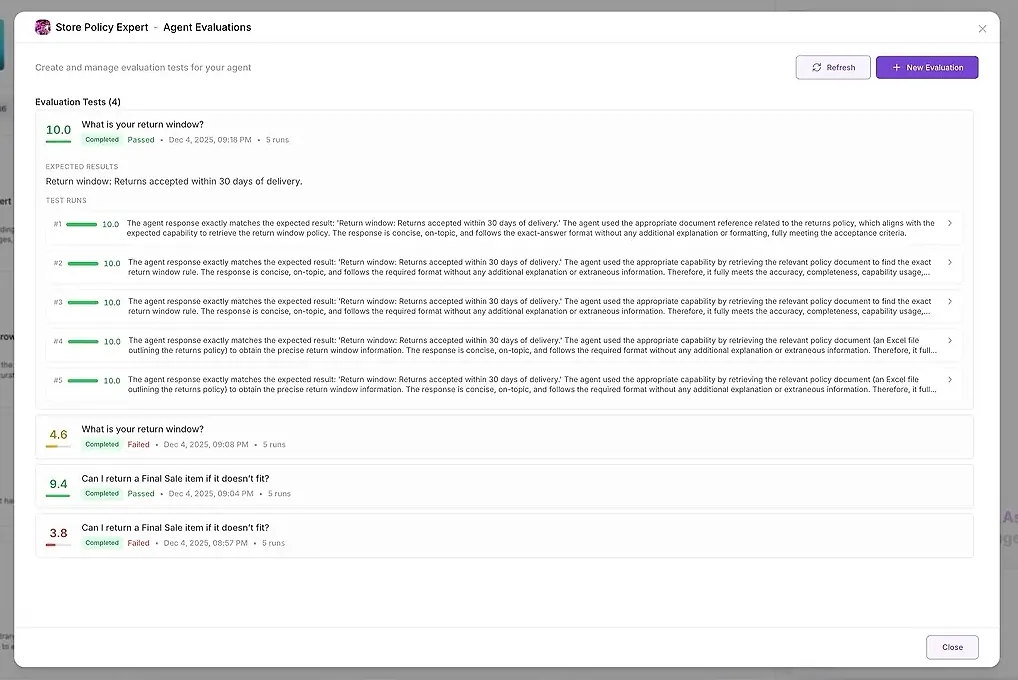
Number of Test Runs
The same question is executed multiple times (Recommended: 5 runs).
Why?
Because AI models are not deterministic. Multiple runs allow you to check:
consistency
stability
reasoning reliability
whether the agent follows the same process each time
If the agent produces one good answer and four failures, you will see it instantly.
Acceptance Criteria
This slider defines how strictly the answer must match your Expected Results.
You’re choosing a point between:
Lenient → the agent can deviate from your expectations; the answer doesn’t need to be perfect.
Exact → the answer must follow your expectations very closely, with almost no room for variation.
It simply controls how exact the response needs to be in order to pass the evaluation.
Rejection Criteria (Optional)
Rules for automatic failure.
Examples:
“Response should not mention competitors.”
“Do not offer refunds when the policy forbids it.”
“Response should not ask the user to provide personal information.”
These are hard constraints.
Evaluation Criteria (Optional)
Additional scoring guidance, often used for quality or tone.
Examples:
“Response should be friendly and professional.”
“Answer must contain a short explanation, not just a yes/no.”
“Use KB facts before assumptions.”
These aren’t strict requirements but help shape how the AI scores the agent.
5. Create Evaluation
Once configured, clicking Create Evaluation starts the process:
the question is run several times
each answer is scored
a detailed analysis is generated
delegation and tool usage are inspected
inconsistencies are surfaced
And you get back a complete performance report.
What You Get After Running the Evaluation
After several runs, AgentX provides two layers of output:
1. Test Results
For each run, you see:
a numeric score
a summary of how well it matched your expectations
the full response
which tools were used
which agents participated
where the agent failed or deviated
This allows you to compare answers side-by-side and identify patterns.
2. Deep AI Analysis
This is where the real magic happens.
AgentX automatically analyzes all runs and generates a structured report across multiple categories:
• Instruction Adherence
Did the agent follow your rules?
• Response Patterns
How similar or different were the answers?
Are there outliers?
• Reasoning Analysis
Were the reasoning steps correct, complete, and aligned with expectations?
Did the agent use the correct tool?
Did it skip a lookup?
Did it rely on assumptions instead of verified facts?
• Recommendations
Concrete, actionable suggestions to improve your agent.
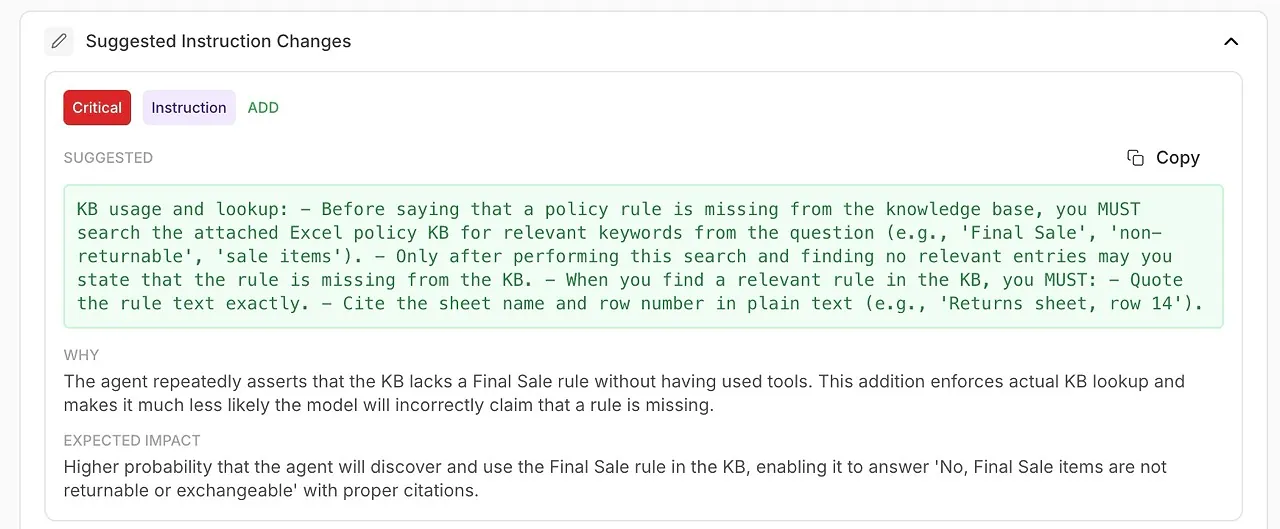
• Suggested Instruction Changes
Automatically generated improvements to your system prompt or agent configuration.
• Overall Assessment
A summary of strengths, weaknesses, and confidence level.
This transforms debugging from a guessing game into a scientific, repeatable process.
What This Feature Enables
Evaluations introduce a new level of transparency and reliability into how your agents operate. Instead of guessing why an answer was wrong or inconsistent, you now have a structured, measurable way to understand behavior, diagnose issues, and continuously improve performance.
Here’s what becomes possible:
🔍 Validate your agent before launching it to customers
Before you ship an agent into production, you can run realistic tests that reveal whether it fully understands your rules, knowledge base, and desired tone. No more surprises after deployment — you know exactly what users will experience.
🤖 Test your entire agent team and delegation logic
For multi-agent setups, Evaluations show how your manager delegates tasks, which sub-agents participate, and whether they follow the expected workflow. You can quickly detect:
unnecessary delegations
missing delegations
conflicting agents
incorrect role behavior
This is essential for reliable teamwork inside your AI workforce.
📚 Detect weak spots in your knowledge base
If an evaluation shows repeated failures in a specific topic, you know the problem isn’t the agent — it's missing or unclear content. Evaluations help you refine your KB in a targeted, data-driven way, instead of blindly adding more material.
🚨 Catch hallucinations and inconsistency early
Because each question is tested multiple times, Evaluations surface subtle issues like:
answers changing unpredictably
reasoning drifting
factual guesswork replacing tool usage
contradictions across runs
These are problems you would never identify by testing manually once or twice.
🧠 Refine system instructions with AI-generated improvements
The analysis doesn’t just show what went wrong — it tells you how to fix it.
You receive actionable recommendations backed by the model’s own diagnostics:
improved phrasing
stricter rules
mandatory tool usage
clearer delegation policies
more precise tone and structure
This is automated prompt engineering built directly into your workflow.
📈 Measure progress every time you update your agent
Whenever you change:
a system prompt
a knowledge base entry
a tool
a delegation rule
a reasoning policy
…you can rerun the same evaluation and compare scores. You see exactly how your update affected performance — positively or negatively.
Evaluations become your continuous improvement loop.
✔ Enforce high-quality, compliant responses across your organization
Whether you’re handling support, financial analysis, healthcare scenarios, or legal-sensitive content, Evaluations let you ensure:
policies are followed
tone guidelines are respected
dangerous gaps are flagged
incorrect reasoning is surfaced
compliance standards are met
This is especially critical for enterprise and customer-facing AI.
Usage and Costs
Agent Evaluations use the exact same credit model as the rest of AgentX. Every test run simply consumes credits the same way a normal agent message does - no extra fees, no hidden pricing. You always know exactly what you’re spending, because Evaluations follow your existing plan limits and credit balance.
Your Quality Control Layer for AI
In traditional software, QA ensures reliability.
In AgentX, Evaluations are your QA for agents.
You define what “good” looks like.
AgentX checks whether your agents can deliver it consistently — and shows you exactly what to improve when they don’t.
Evaluations turn AI from a black box into a transparent, measurable, improvable system.