
Custom Privacy Policy Setup
Learn how to set up a custom Privacy Policy link for your AgentX lead generation flow.
AgentX allows you to collect leads directly through your AI assistants while complying with global privacy regulations.
This tutorial explains how to configure a custom Privacy Policy link in your Lead Generation settings, ensuring your chatbot behaves correctly under both GDPR and non-GDPR rules.
How to setup Lead Generation?
Step 1: Open Lead Generation Settings
Go to your AgentX dashboard.
Navigate to Integrations → Lead Generation.
Toggle Lead Generation to Enabled (as shown in the image above).
Check the option “Use custom Privacy Policy URL.”
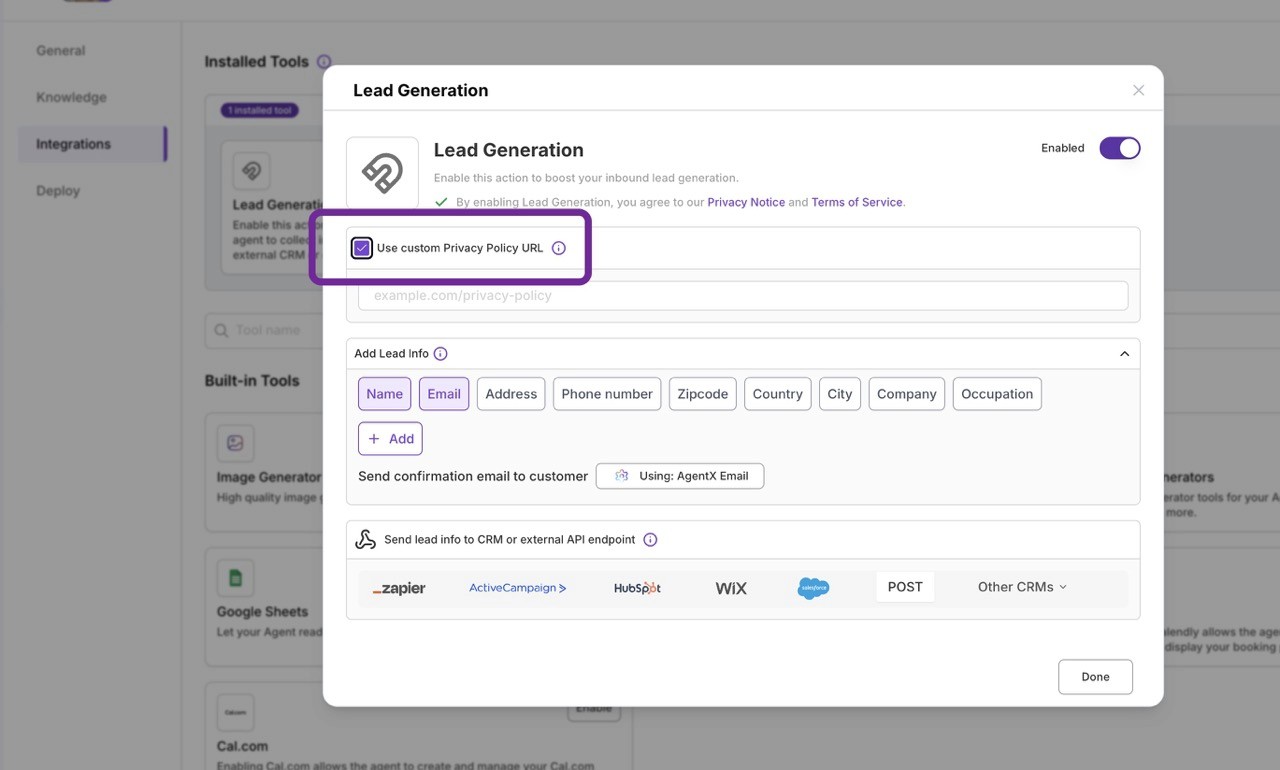
Step 2: Add Your Privacy Policy Link
Enter your custom Privacy Policy URL, e.g.:
https://www.agentx.so/privacyClick Done.
Step 3: How Privacy Policy Display Works
AgentX automatically adjusts how and when the privacy notice is shown, depending on region and settings:
For GDPR Countries (EU, UK, etc.):
With a custom Privacy Policy:
Your policy link appears before the conversation starts (required consent).
It also reappears before any sensitive data (like name/email) is collected.
Without a custom Privacy Policy:
The notice only appears when the agent attempts to collect sensitive data, using AgentX’s default policy.
For Non-GDPR Regions:
With a custom link:
Your Privacy Policy appears only when the agent requests sensitive data.
Without a custom link:
The same behavior applies, but it uses AgentX’s default Privacy Policy.
Best Practices
Always use your company’s own Privacy Policy for full legal compliance.
Keep your link updated and hosted on a secure (HTTPS) domain.
Clearly describe how you handle data in your Privacy Policy page.
Related article:
Check how to set up lead generator with AgentX.
https://www.agentx.so/agentx-tutorial/set-up-lead-generator-collect-leads-email-and-more
