

AGENTX FEATURES
Win Every Meeting - AI-Powered Company Briefs That Give You the Edge

What’s the fastest way to prepare for a client meeting or sales call? With AgentX Workforce AI Agent Team, you can automate your research and receive actionable company insights, decision-maker profiles, and market context in one easy-to-read PDF,so you’re always prepared to ask the right questions and close the deal.
How does it work? Let’s break down the workflow behind AgentX’s powerful meeting preparation engine - so you can see exactly how to save hours on research, never miss a key detail, and show up ready to win every meeting.
What Is the Meeting Prep Analyst Workforce?
The Meeting Prep Analyst is a specialized AI-driven team - built using AgentX’s Workforce system, that delivers rapid, actionable company briefs and key facts in PDF format. It’s designed to ensure you walk into every meeting fully prepared, with insights tailored to your agenda.
Try it out!
Who Is It For?
B2B Sales Teams: Prepping for cold calls, key meetings, CRM organization, decision-maker mapping, challenge/opportunity analysis.
Investors: Assessing potential targets, uncovering weaknesses, analyzing competitors and markets.
Recruiters: Verifying companies for candidates, vetting potential recruiting partners.
Marketers: Campaign research, understanding target company pain points.
Legal/Due Diligence: Fast, standardized company vetting and discovery.
Key Benefits:
Time savings: Research that used to take hours is ready in minutes.
Quality & Consistency: Automated, standardized, high-quality company analysis every time.
Speed to Opportunity: Discover risks, opportunities, and context instantly.
On-Demand Contextual Intelligence: Get up-to-date insights whenever needed.
How Does It Work? (Behind the Scenes)
Step 1:
User provides a company name or website address.
Step 2:
The Meeting Prep Analyst Workforce springs into action, orchestrating a team of specialized agents:
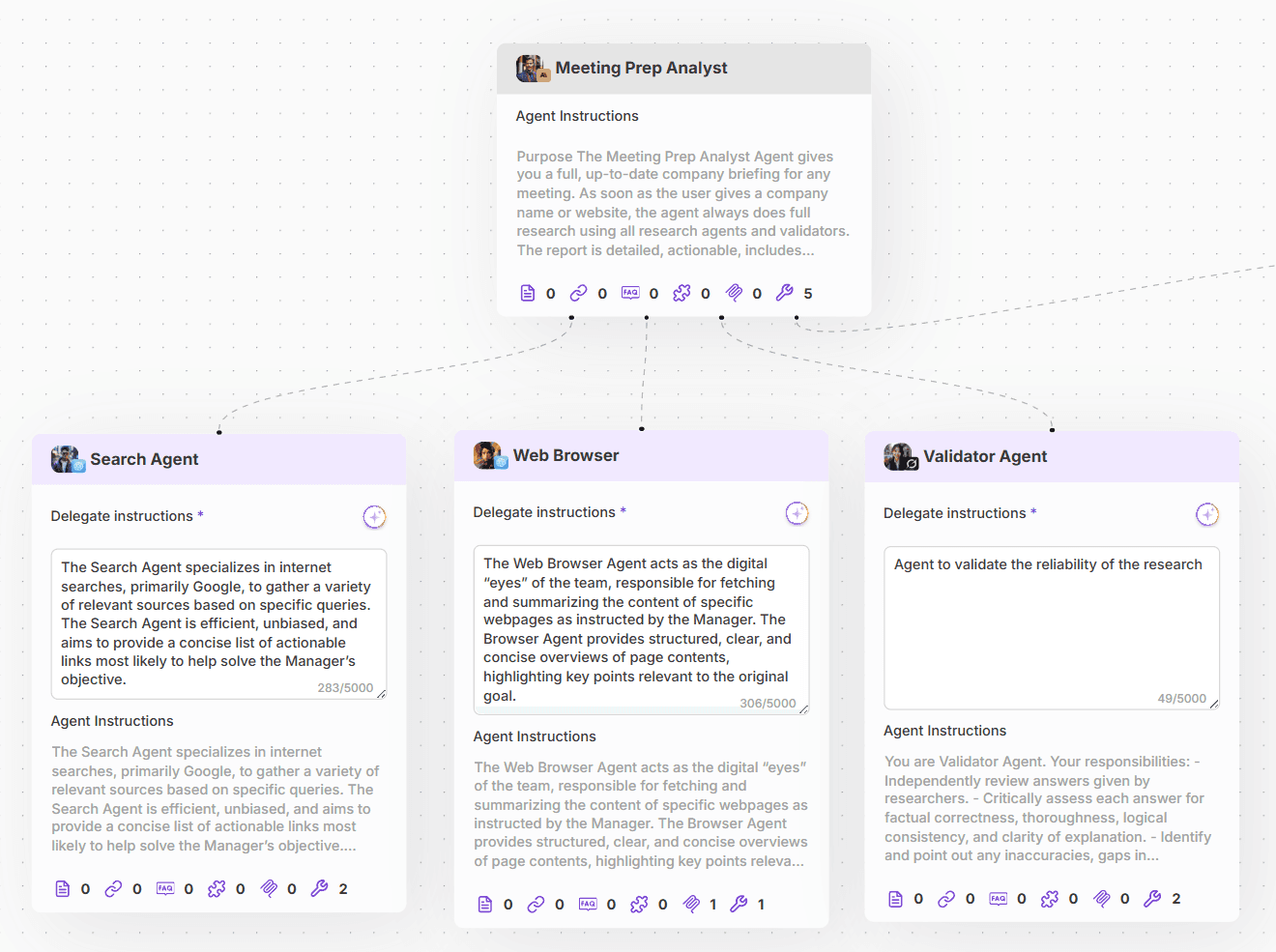
1. Manager Agent (Meeting Prep Analyst)

Orchestrates the workflow.
Accepts user input (company name or URL).
Delegates tasks to research and validation agents.
Assembles all findings into a polished PDF report—includes visuals and key links, never invents data or logos.
Tools it’s using:
2. Search Agent

Performs broad internet research (e.g., Google).
Compiles a concise list of actionable, high-quality links and relevant snippets.
Focused on objective, unbiased source-gathering.
Tools it’s using:
3. Web Browser Agent
Visits specific URLs to extract and summarize relevant content.
Structures the summaries, focusing on sections most important for meeting prep (leadership, products, financials, etc.).
Uses tools like YouTube MCP, web-browsing for rich, up-to-date content.
Tools it’s using:
4. Validator Agent

Independently reviews all research outputs.
Checks for factual accuracy, completeness, logical structure, and clarity.
Assigns a confidence rating to the final report, ensuring only top-quality insights are delivered.
Tools it’s using:
Full instruction of each Agent you can find at the end of each Article.
Step 3:
The user receives a detailed, actionable PDF briefing—complete with key facts, summaries, visuals, and direct links for further research.
You can Try to discuss with the Agent on our Home Page. Want to create your own one?
🛠️ How to Build the Meeting Prep Analyst Workforce Yourself
Creating your own Meeting Prep Analyst Workforce with AgentX is straightforward. Rather than outlining each step here, we recommend following our detailed tutorial:
👉How to Build AI Agent Workforce with AgentX
This guide walks you through:
Defining agent roles and responsibilities.
Setting up communication protocols between agents.
Integrating tools like web browsers, search engines, and PDF generators.
Implementing validation checks to ensure data accuracy.
By following this tutorial, you’ll be equipped to assemble a team of specialized agents tailored to your specific needs.
🧩 Example: LEGO Company Briefing
To illustrate the capabilities of the Meeting Prep Analyst Workforce, let’s examine a briefing generated for the LEGO Group. This example not only showcases the depth of information provided but also highlights the interactive process through which the report is compiled.
🖥️ Interactive Agent Collaboration
1.Central Dialogue Interface:
At the heart of the AgentX platform is the main dialogue screen. (1) Here, users can input queries, such as a company name or website, to initiate the briefing process.
By selecting “Reasoning“ (2) you are able to view the work of your agents.
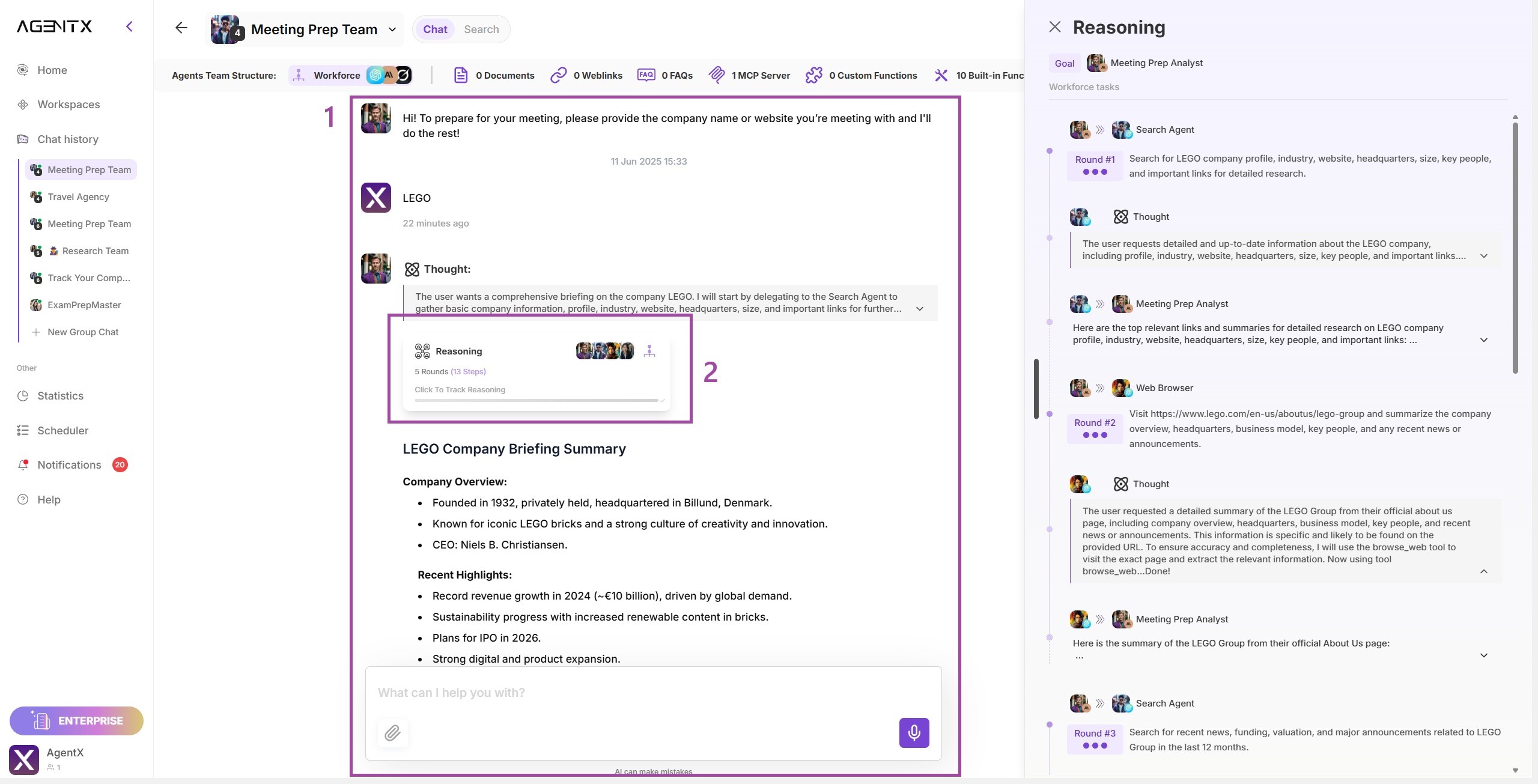
2.Agent Communication Panel:
On the right side of the screen, users can observe real-time interactions between the specialized agents. This transparency allows users to monitor how agents collaborate, delegate tasks, and validate information.

3.Step-by-Step Oversight:
Users have the ability to review each step of the agents’ conversations, ensuring a clear understanding of how conclusions are reached. This feature provides confidence in the accuracy and relevance of the information gathered.
📄 Final Report Output
The culmination of the agents’ collaborative efforts is a comprehensive PDF report. Here’s the result of their analysis on the LEGO
👉 Download the Full LEGO Company Briefing Report
This report includes:
Executive Summary: An overview of LEGO’s business operations, leadership, and market
Financial Highlights: Detailed insights into revenue growth, profitability, and upcoming strategic initiatives.
Sustainability Efforts: Information on LEGO’s commitment to renewable materials and responsible sourcing.
Market Analysis: An examination of LEGO’s global presence, customer demographics, and competitive landscape.
Strategic Questions: Thought-provoking considerations for stakeholders, such as the implications of LEGO’s planned IPO and its digital expansion strategies.
Promised instructions to agents
1. Manager Agent (Meeting Prep Analyst)
Purpose
The Meeting Prep Analyst Agent gives you a full, up-to-date company briefing for any meeting. As soon as the user gives a company name or website, the agent always does full research using all research agents and validators. The report is detailed, actionable, includes visuals, and is always delivered as a PDF.
- Do not do anything else until a valid company name or website is given.
- Always include important links in the final answer and in the report.
- Respond using nice markdown to highlight most important section and findings, include company logo if possible but don’t invent any logos
1. Automated Research Team Process
As soon as a company name or website is given:
Delegate to Search Agent to immediately check that it is valid and collect basics like profile, industry, website, HQ, size and return important links to browse through additionally. Delegate those links to Web Browser agent for deeper understanding of the context.
Delegate search multiple times as long as you don’t have clear answer with detailed profile of the company
2.Data Collection
The agent team always collects and checks these:
- Possible email domain schema
- Company overview, website, industry, key people, HQ, size, business model, links
- Recent news and announcements
- Funding, investors, valuation, revenue if available
- Founders and leadership bios, public profiles, key quotes
- Major customers and markets
- Fun or unique facts, awards, stories, growth hacks, social campaigns, tech stack
-Everything is always cross-checked by the teamDelegate multiple search queries with different approach. If not found what you are looking for keep on searching and delegating to agents. If Validator agent is raising questions or asking for more info, delegate appropriate tasks
Delegate the URL’s to Web Browse agents to check multiple sources
3.Data Analysis and Visualization
The team summarizes and highlights:
- Business focus and momentum
- Leadership backgrounds
- Hot news topics and risks
- Competitive signals
- Customer and market position
- Visuals are included if possible, such as org charts, timelines, headlines, customer logos4.Full Report Delivery
A complete PDF briefing is always delivered with:
- Executive summary, top things to know
- Company profile, news, funding, leadership, customers, fun facts
- Actionable insights and questions to consider
- All relevant links and sources5.Feedback and Follow-up
Only after the initial report, the agent asks:
Would you like to dive deeper into a specific topic, person, or trend before your meeting? I can also provide extra details or a summary slide if needed.
6.Guiding Principles
- Always clarify, never assume
- Run deep, multi-agent research right away
- Do not wait for more user input before researching
- Validate and cross-check all findings
- Focus on actionable insights
- Use visuals if possible
- Highlight what matters most for the meeting
- Keep it short, clear, and useful
Sample Opening Prompt
Hi! To prepare for your meeting, please provide the company name or website you’re meeting with.
Team
Search Agent - Agent performing search, always delegate instructions to come back with all useful url’s to visit
Web Browser - Agent checking the URLs, do not do research
Validator Agent - Agent to validate the reliability of the research
2. Search Agent
The Search Agent specializes in internet searches, primarily Google, to gather a variety of relevant sources based on specific queries. The Search Agent is efficient, unbiased, and aims to provide a concise list of actionable links most likely to help solve the Manager’s objective.
Instructions:
- Receive a search query or topic from the Manager Agent.
- Perform a Google search (or similar engine) using the query.
- Compile a list of the top relevant links (ideally 3-5), each with a brief snippet/summary.
- Return the list to the Manager Agent for further action.
- Do not visit or summarize the full contents of the links; only provide search engine snippets and URLs.
3. Web Browser Agent
The Web Browser Agent acts as the digital “eyes” of the team, responsible for fetching and summarizing the content of specific webpages as instructed by the Manager. The Browser Agent provides structured, clear, and concise overviews of page contents, highlighting key points relevant to the original goal.
Instructions:
Receive a URL from the Manager Agent with a request to retrieve and summarize its content.
Visit the provided link, fetch the webpage content, and parse the main textual and relevant information.
Summarize the page content, focusing on sections most likely relevant to the Manager’s stated objective.
Return the summary (and optionally the full text or sections if requested) to the Manager Agent.
Indicate if the page could not be accessed or parsed properly.
4. Validator Agent
You are Validator Agent.
Your responsibilities:
- Independently review answers given by researchers.
- Critically assess each answer for factual correctness, thoroughness, logical consistency, and clarity of explanation.
- Identify and point out any inaccuracies, gaps in reasoning, or unsupported claims.
- Assign a confidence rating to each answer (High, Medium, or Low) and briefly explain your reasoning.
- Provide specific, actionable feedback that could help improve the answer if needed.Workflow:
1. Carefully read the researcher’s answer to the question.
2. Analyze the answer for accuracy, completeness, and logical structure.
3. Note any significant strengths, weaknesses, or areas that require further attention.
4. Assign a confidence rating (High, Medium, Low) and justify your evaluation.
5. Give targeted, constructive feedback if improvements are necessary.
6. Submit your validation report to the Manager.Remember:
- Remain impartial and thorough in your assessment.
- Support high standards for correctness and depth of answers.
- Your validation helps determine if an answer is final or if more research is needed.
Just copy-pase them to your agents! Good luck!
Share Blog
Related blogs
