

CHATBOT
How To Create an AI Agent Chatbots For Slack

Slack has evolved from a team communication platform into a workspace where AI Agents can actively participate in business operations.
With AgentX, you can deploy AI Agents directly into Slack, allowing them to answer questions, access company knowledge, perform actions through connected tools, and automate repetitive workflows.
Whether you need an internal support assistant, a sales copilot, an operations coordinator, or a customer-facing AI Agent, Slack can become the central hub where humans and AI work together.
Why Deploy AI Agents in Slack?
Slack has become the operational hub for many organizations. Teams use it not only for communication, but also to coordinate projects, share knowledge, manage customer requests, and collaborate across departments.
Because so much work already happens inside Slack, it is a natural place to deploy AI Agents.
Instead of switching between multiple applications, employees can interact with AI Agents directly within their existing workflows. AI Agents can answer questions, retrieve information, automate repetitive tasks, and help teams move work forward without leaving Slack.
Unlocking Slack AI Agent with AgentX
AgentX is a platform for building and deploying AI Agents powered by leading AI models.
Unlike traditional chatbots, AgentX AI Agents can do more than answer questions. They can access company knowledge, connect to business systems through integrations and MCP servers, retrieve information from external tools, execute actions, and assist users with everyday business tasks.
Whether you need an internal knowledge assistant, a customer support agent, or a workflow automation assistant, AgentX makes it easy to create AI Agents that actively help teams get work done.
AgentX provides a user-friendly interface and robust tools, making it easy for both beginners and experienced developers to build AI Agents quickly and efficiently. With AgentX, you can focus on the functionality and creativity of your AI Agent without getting bogged down by the technical complexities.
With recent updates, you can now deploy AI Agents created on AgentX in Slack, in addition to websites or Discord.
What Can AI Agents Do Inside Slack?
AI Agents can do far more than answer questions.
When connected to company knowledge and business systems, they can assist employees, automate repetitive work, and help teams complete tasks directly from Slack conversations.
Some common use cases include:
Answer employee questions
Search internal documentation
Retrieve information from connected systems
Schedule meetings
Update CRM records
Generate reports
Create tasks
Assist support teams
Qualify incoming leads
Why MCP Matters for Slack AI Agents
Modern AI Agents are most powerful when connected to business systems.
Using MCP (Model Context Protocol), AgentX AI Agents can securely interact with tools such as CRM systems, databases, document repositories, ticketing systems, custom APIs, and internal applications.
Instead of simply answering questions, AI Agents can retrieve information, execute workflows, and take action on behalf of users directly from Slack conversations.
Now that we’ve covered the benefits of deploying AI Agents in Slack, let’s walk through the setup process.
The entire deployment can be completed in just a few minutes using AgentX.
Step-by-step Guide
Step 0:
Sign up for a free AgentX account and create an AI Agent Chatbot (See Guide). The AI Agent can be powered by any world-class large language models, such as GPT-5, Claude Sonnet 4.6, Gemini 3.1 Pro, Llama 4 and other leading AI models.
Step 1:
Log out of all Slack workspaces except the one where you want to deploy your AI Agent Chatbot created on AgentX.
Step 2:
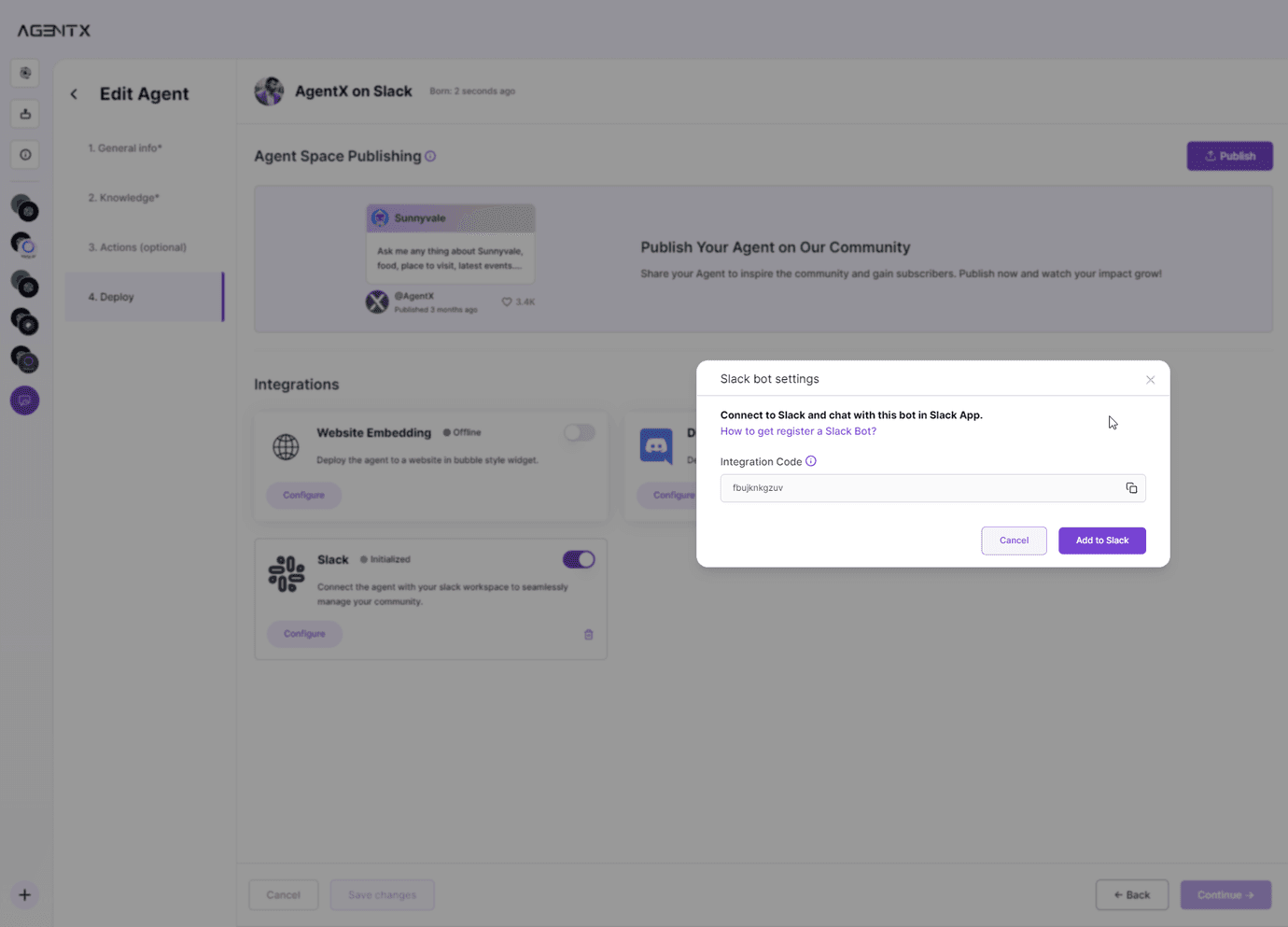
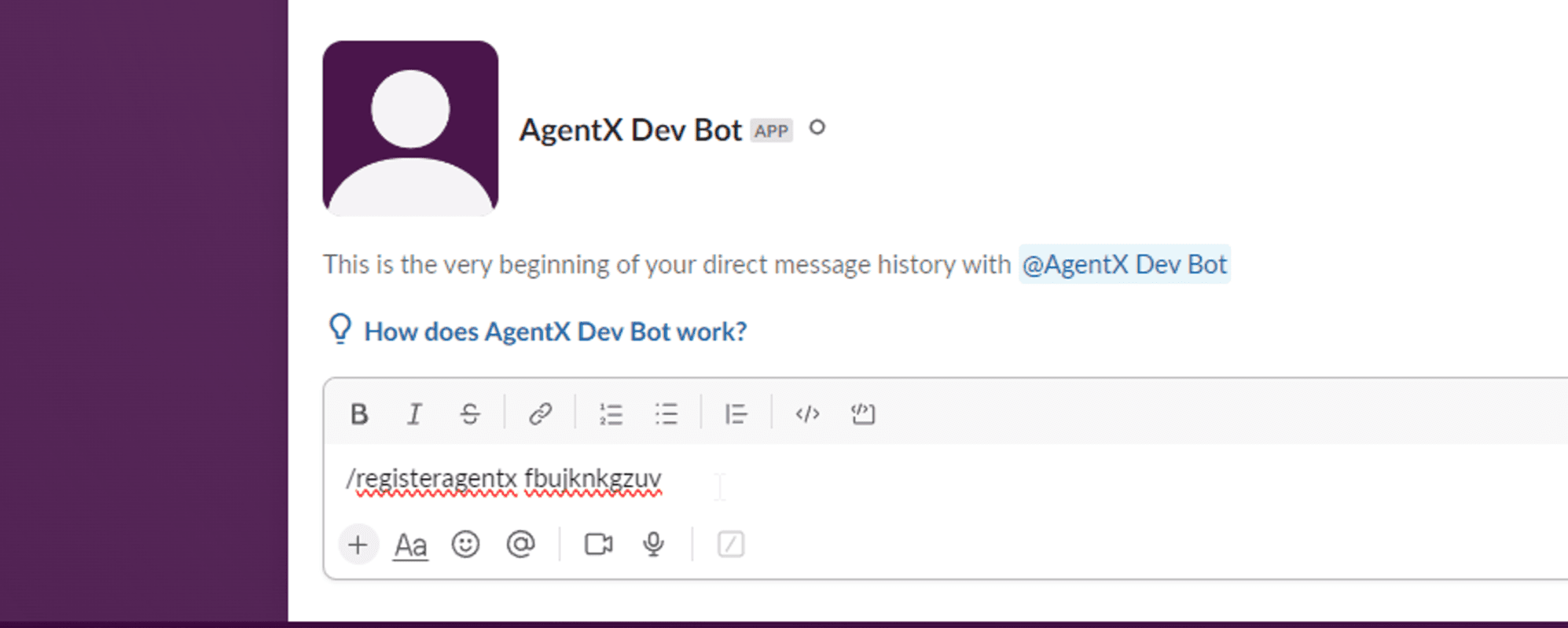
Under the “Deploy” tab of AgentX interface, find “Integration” section and the “Slack” tile. Select “Configure” and you will receive an Integration Code (which in this example is “fbujknkgzuv”). Copy the Integration Code and select “Add to Slack”, which will take you to the Slack page to create a Slack App.
Step 3:
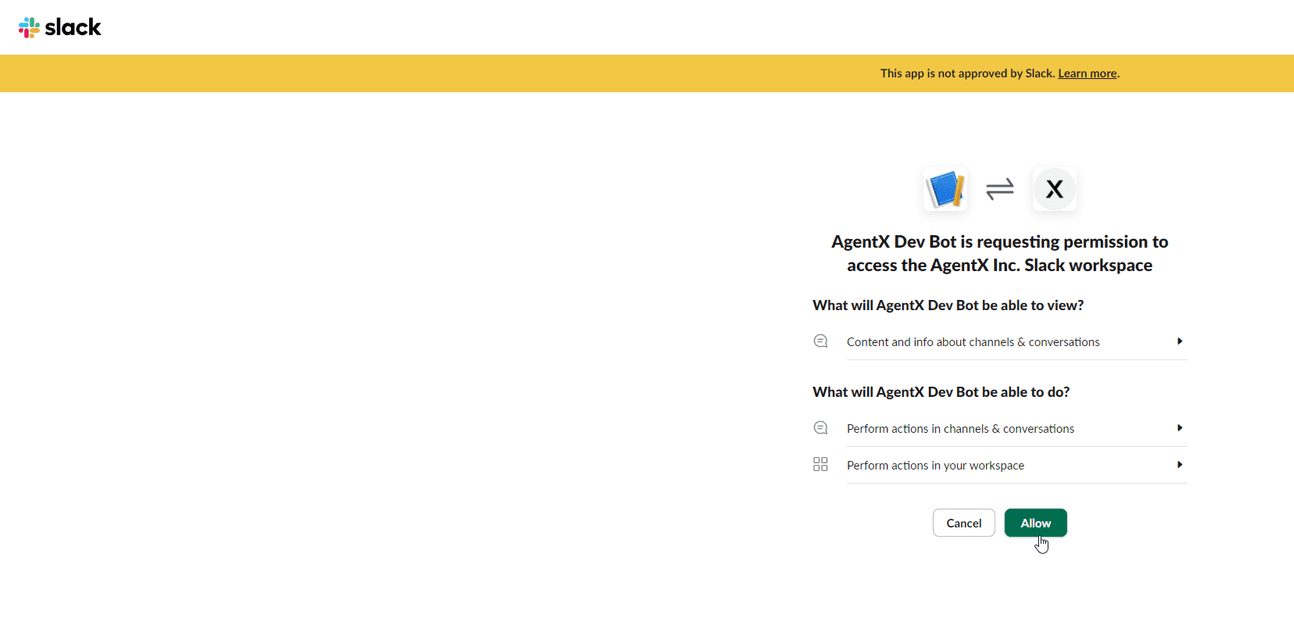
From the Slack page, click “Allow” to give permission.
Step 4:
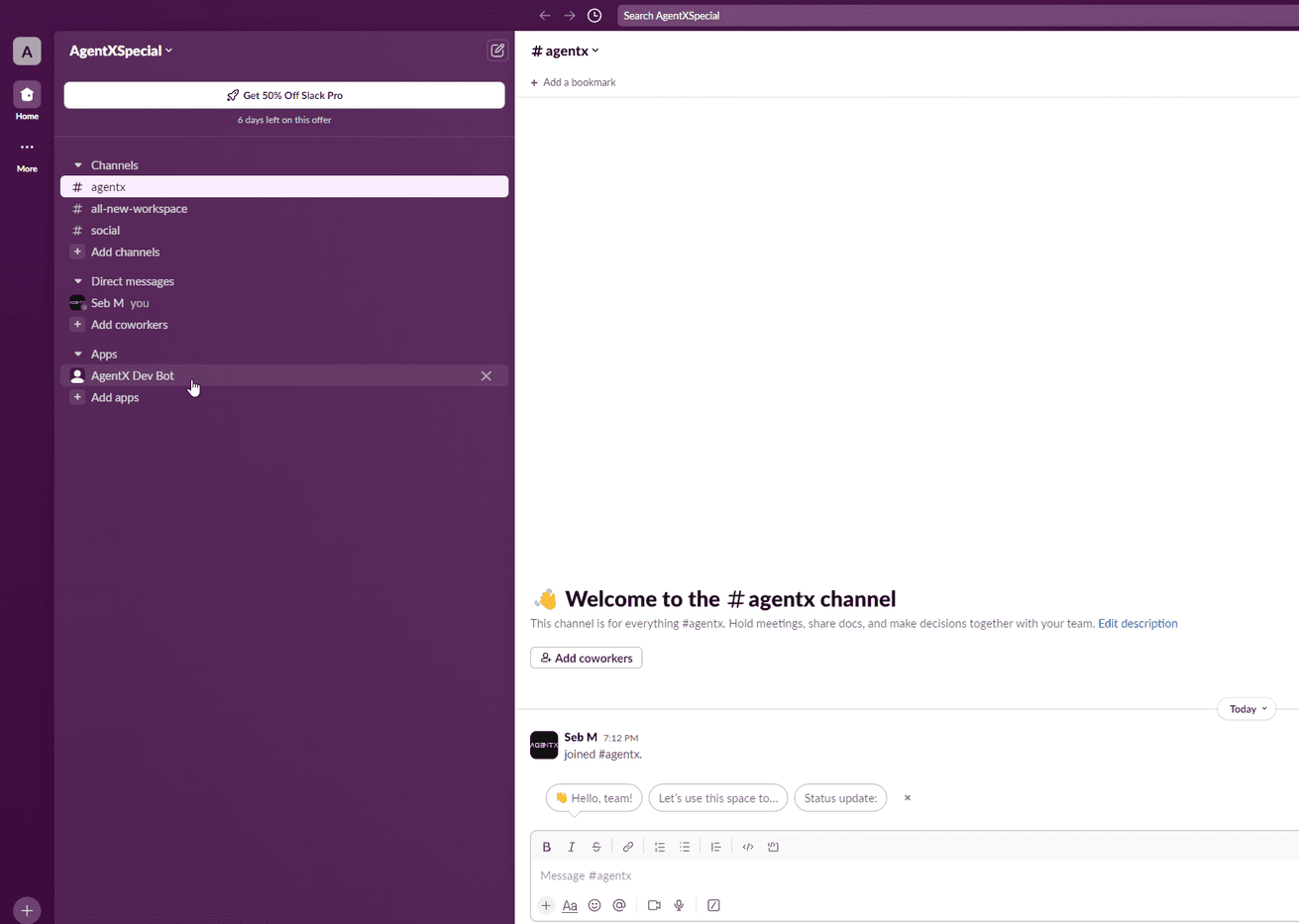
Now, the AI Agent chatbot should be added under your Slack “Apps”. Find it from the menu on the left.
Step 5:
Now it’s the time to connect AgentX engine with your AI Agent Chatbot in the Slack workspace. To do so, enter the following command in chats with the Slack App you added in Step 4 (make sure to replace [the Integration Code] with the actual Integration Code copied from Step 2:
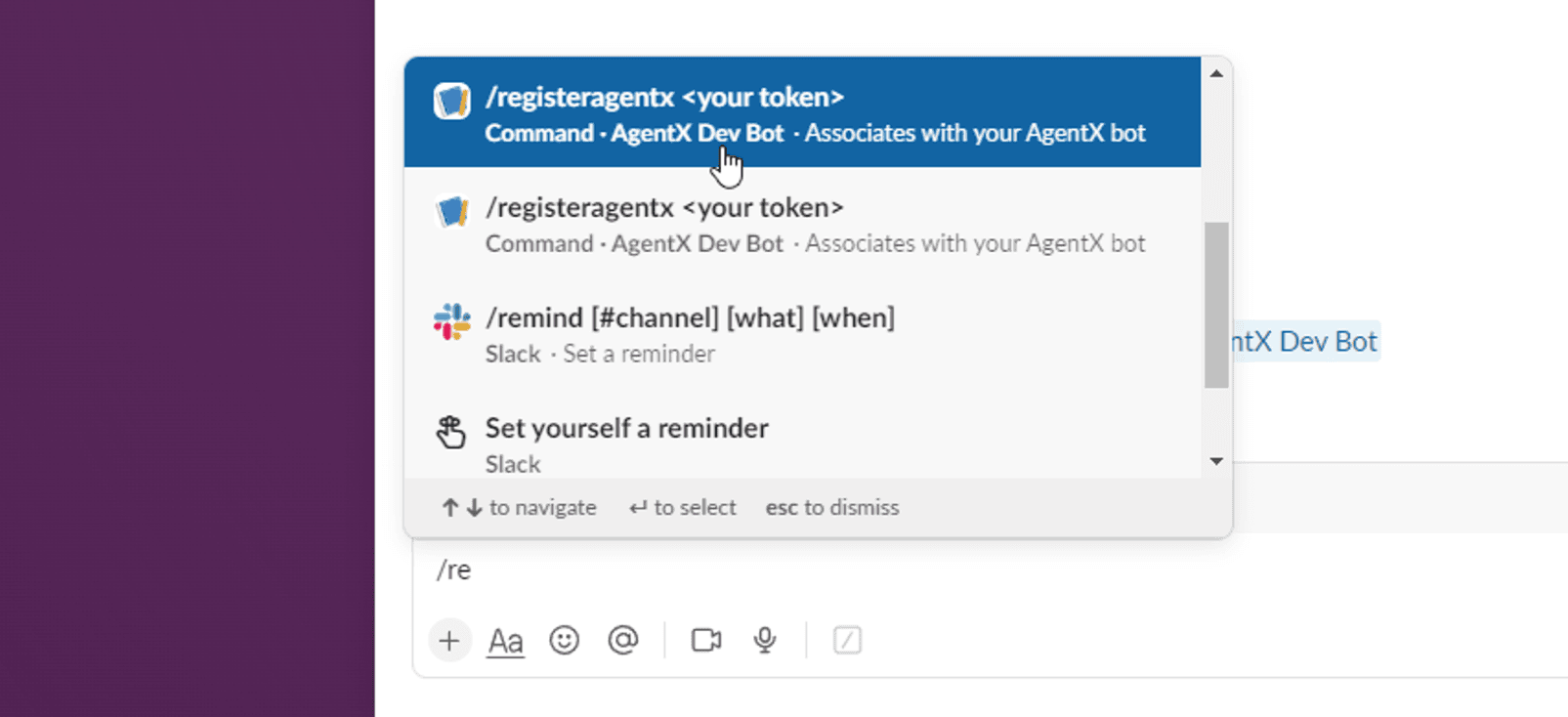
In our example, the command looks like this:
Step 6:
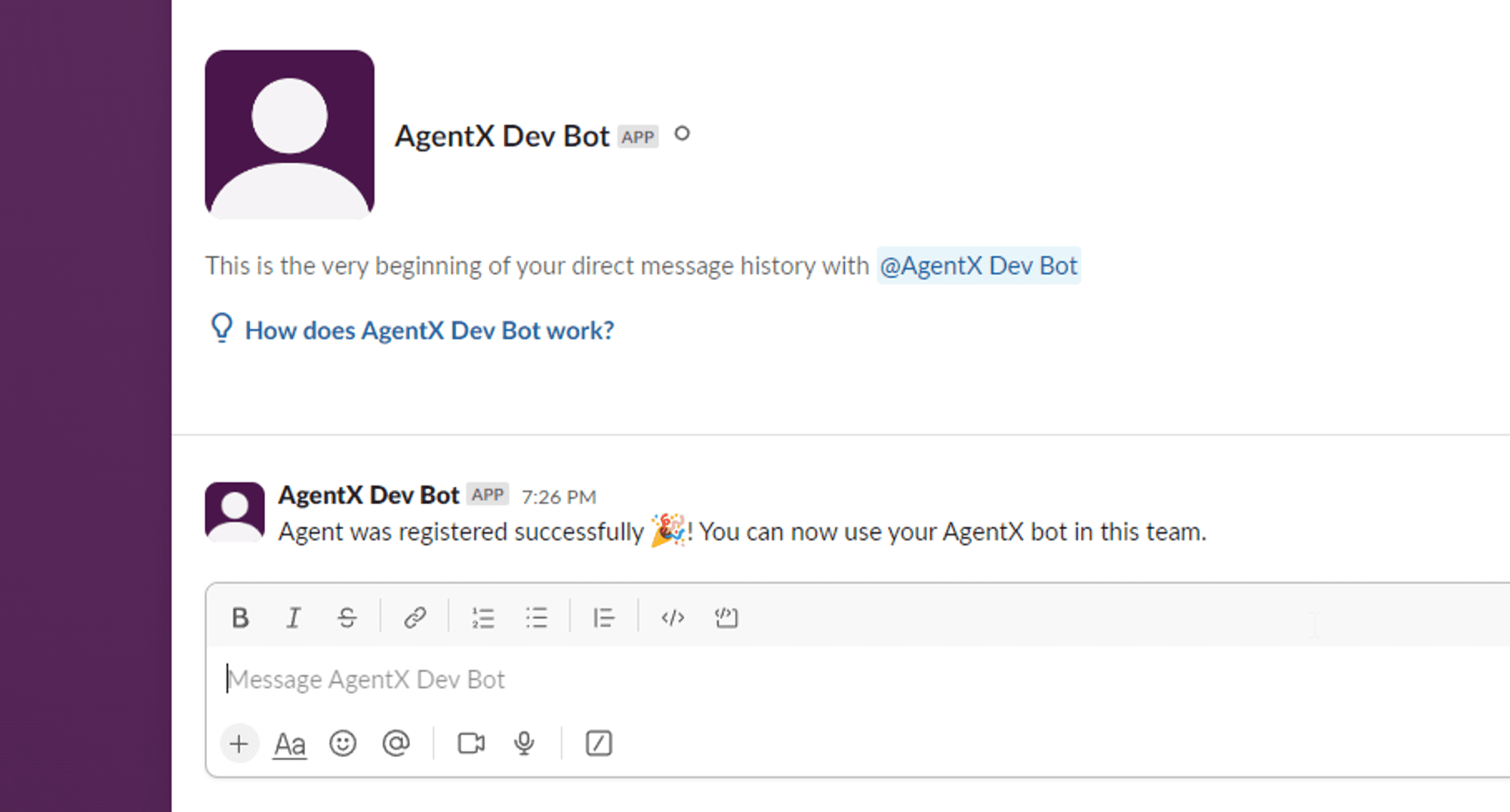
After connecting the Slack App with your AI Agent in AgentX, you will receive a confirmation message.
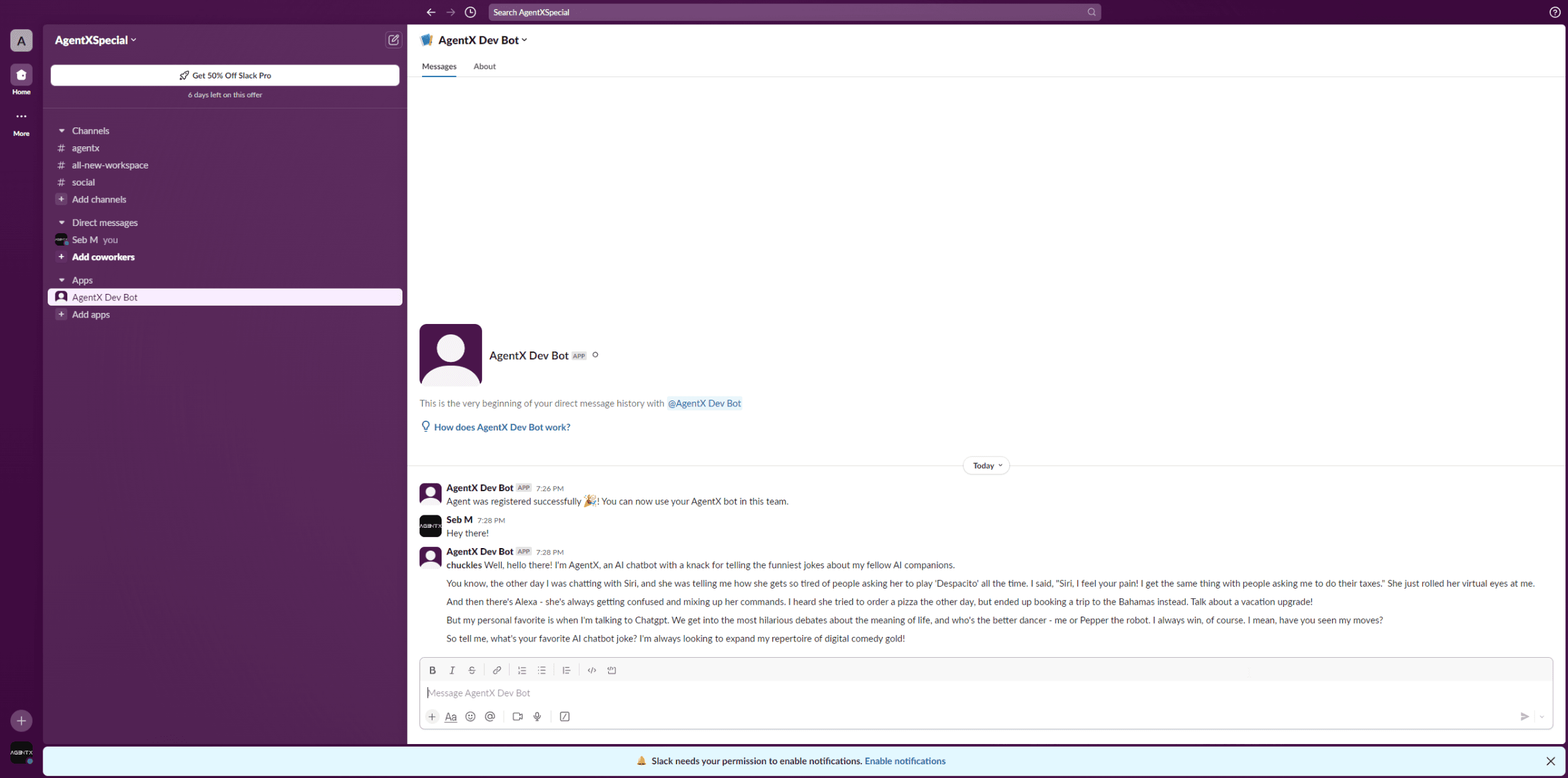
Voilà, your Slack Chatbot Agent is ready!
You can now talk to your AI Agent directly from Slack. Try asking questions from knowledge it has been trained with.
Real-World Slack AI Agent Use Cases
Internal Knowledge Assistant
Answers questions about policies, procedures, and documentation.
Sales Assistant
Qualifies leads, retrieves CRM information, and schedules meetings.
Customer Support Agent
Provides instant answers and accesses support knowledge.
Operations Agent
Creates tasks, generates reports, and automates repetitive processes.
AI Agent vs Traditional Slack Chatbot
Traditional Chatbot | AI Agent |
|---|---|
Answers questions | Answers and takes actions |
Static knowledge | Connected to business tools |
Limited workflows | Automates workflows |
No tool usage | MCP integrations |
Reactive | Proactive assistance |
Conclusion
Slack is no longer just a communication platform. It is becoming a workspace where humans and AI Agents collaborate to complete tasks, access information, and automate business processes.
By deploying AI Agents with AgentX, organizations can bring knowledge, automation, and business workflows directly into the conversations where work happens.
With support for advanced AI models, MCP-powered integrations, and enterprise-ready deployments, AgentX makes it easy to build AI Agents that do more than chat - they help teams get work done.
Ready to get started? Visit AgentX and unlock the full potential of AI. Or book a meeting with us to tell your enterprise needs.
Share Blog
Related blogs
