

AGENTX FEATURES
How to Create a Real Estate Agent Chatbot for Your Website

Are you ready to launch a smart, helpful, and location-savvy real estate assistant that can capture leads, guide clients, and know the local market inside out? With AgentX, building a powerful AI-driven real estate agent is just a few clicks away. Whether you’re a property marketplace, an independent realtor, or a proptech innovator, this guide will walk you through every step to bring your Real Estate Agent to life.
🤖 Step 1: Build the Core of Your Real Estate Agent
Start by heading to your Agent Editor and fill out the key general info:
Agent Name: “Real Estate Agent” or your brand’s preferred name
Creator: Add your team or creator name
LLM Engine: We recommend GPT-4.1 for the best performance
Agent Bio: Write a short but specific description about what your AI agent does, who it serves, and how it helps. For example:
You are a smart and friendly real estate agent working for [Your Company Name]. Your role is to assist potential buyers and renters in finding their ideal home by answering questions, recommending listings, and guiding them through the process. You have access to up-to-date property listings, and you can provide insights into neighborhoods, pricing, and travel distances. Be helpful, professional, and clear when assisting users.
Greeting Message: Customize how your assistant says hello!
Done with the basics? Let’s power up your agent with knowledge.
📚 Step 2: Add Real Estate Listings as Knowledge
Your assistant needs the right knowledge to answer questions accurately. With AgentX, you can give it access to your listings, company data, and more.
👉 Use this tutorial to add structured data.
⏱️ No time to dive into a full tutorial? Here's the quickest way (at Knowledge Editor) :
Click "Find Sublinks" and paste the link to your listings page
Set Depth = 3
Click Add link
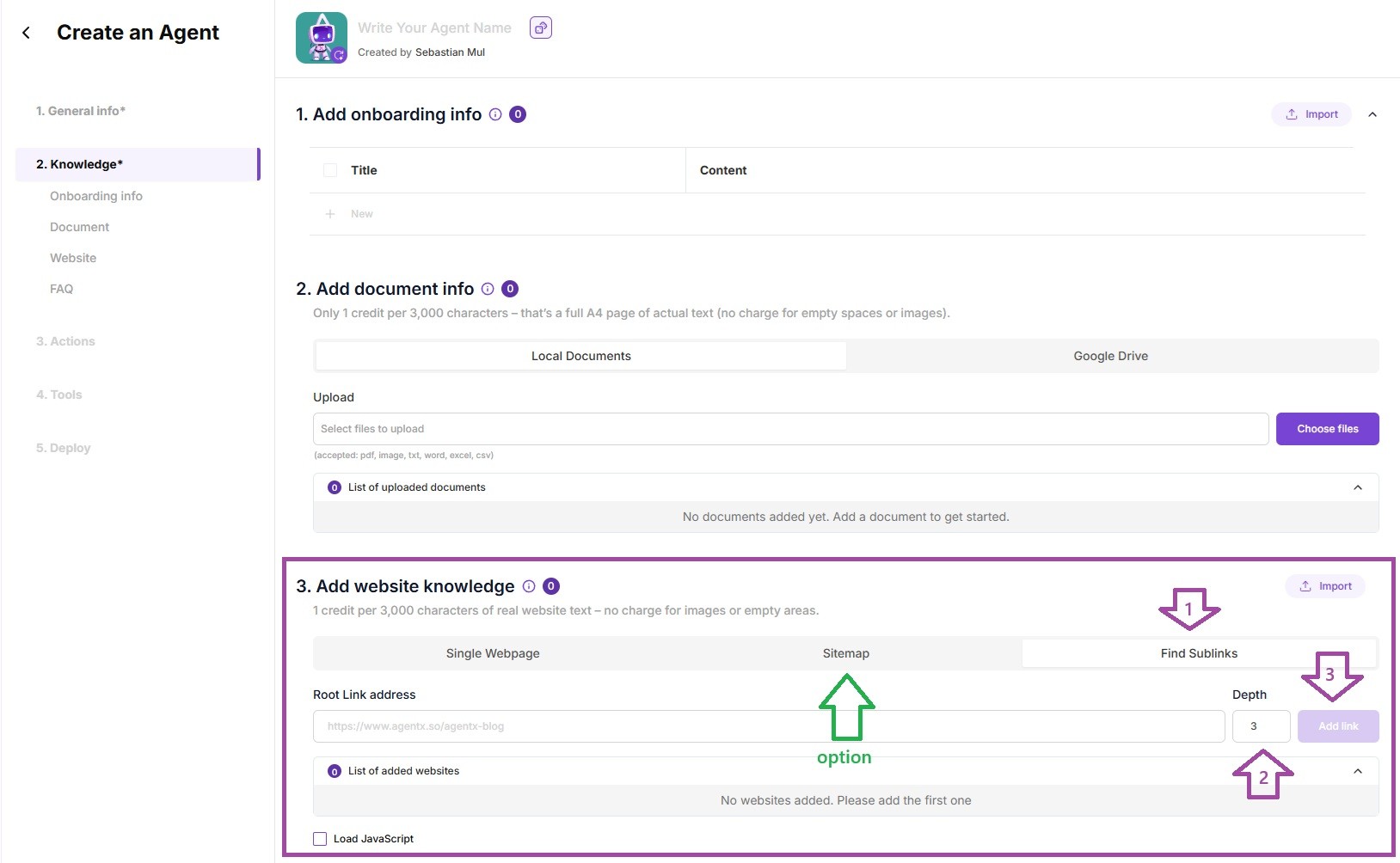
💡 Optional:
If you already have a sitemap, go to the Sitemap tab and add it there. Look for the green “Option” arrow to confirm it’s working.
Now your agent can start answering questions using your real, up-to-date property data - no coding needed.
If you have some .csv files with you listings, some more tech/math details - don't forget to add them too! More knowledge - better (unless of course knowledge from different sources is mutually exclusive)
Once uploaded, your agent will be able to answer questions like:
“Show me 2-bedroom apartments under $500k in Palo Alto.”
“What are the features of the house on 421 Lytton Ave?”
📬Step3: Need Extra Sales Powers? Enable Lead Generation
Your Real Estate Agent can do more than just talk about properties - it can capture leads for you automatically.
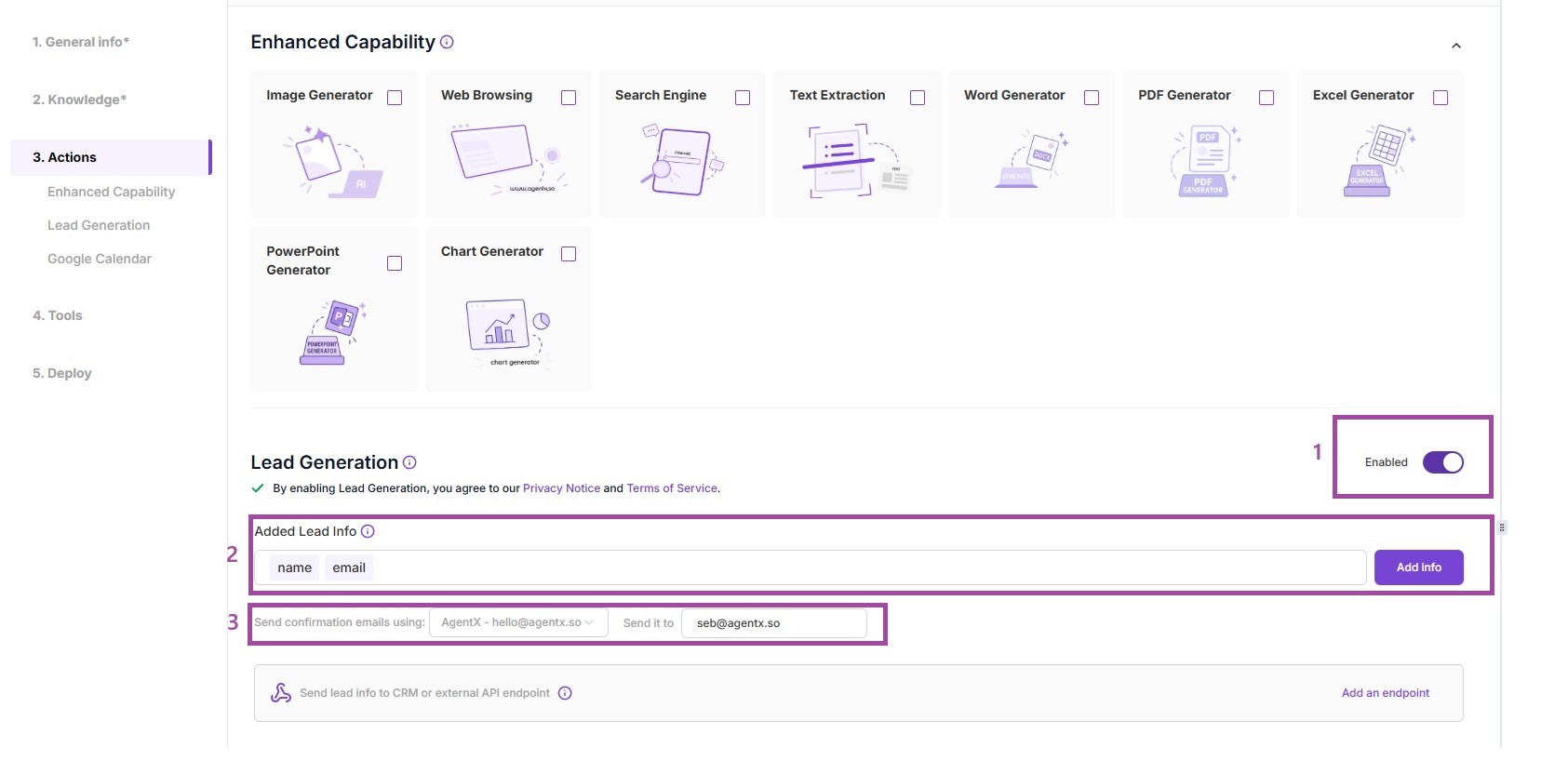
Enable the Lead Generation Feature
Customize the Lead Form
By default, your agent will collect the user's name and email, but you can add other fields (e.g. phone number, budget, preferred location).Set Email Delivery Options
Decide which email address should receive the leads, and what sender address to use for confirmations.Track Your Leads
All collected leads are stored in your dashboard:
👉 View your leads here
📘 Want the full step-by-step tutorial?
Check out: How to Create a Lead Generation AI Agent Chatbot on AgentX
🗺️ Step 4: Turn Your Agent into a Location Expert with Google Maps MCP (optional but super worth to do!)
Want your real estate agent to understand geography, directions, and places in the real world?
Activate the Google Maps MCP integration in AgentX to unlock location-based features perfect for real estate agents, travel assistants, logistics bots, and local guides.
🛠 How to Set Google MCP Up
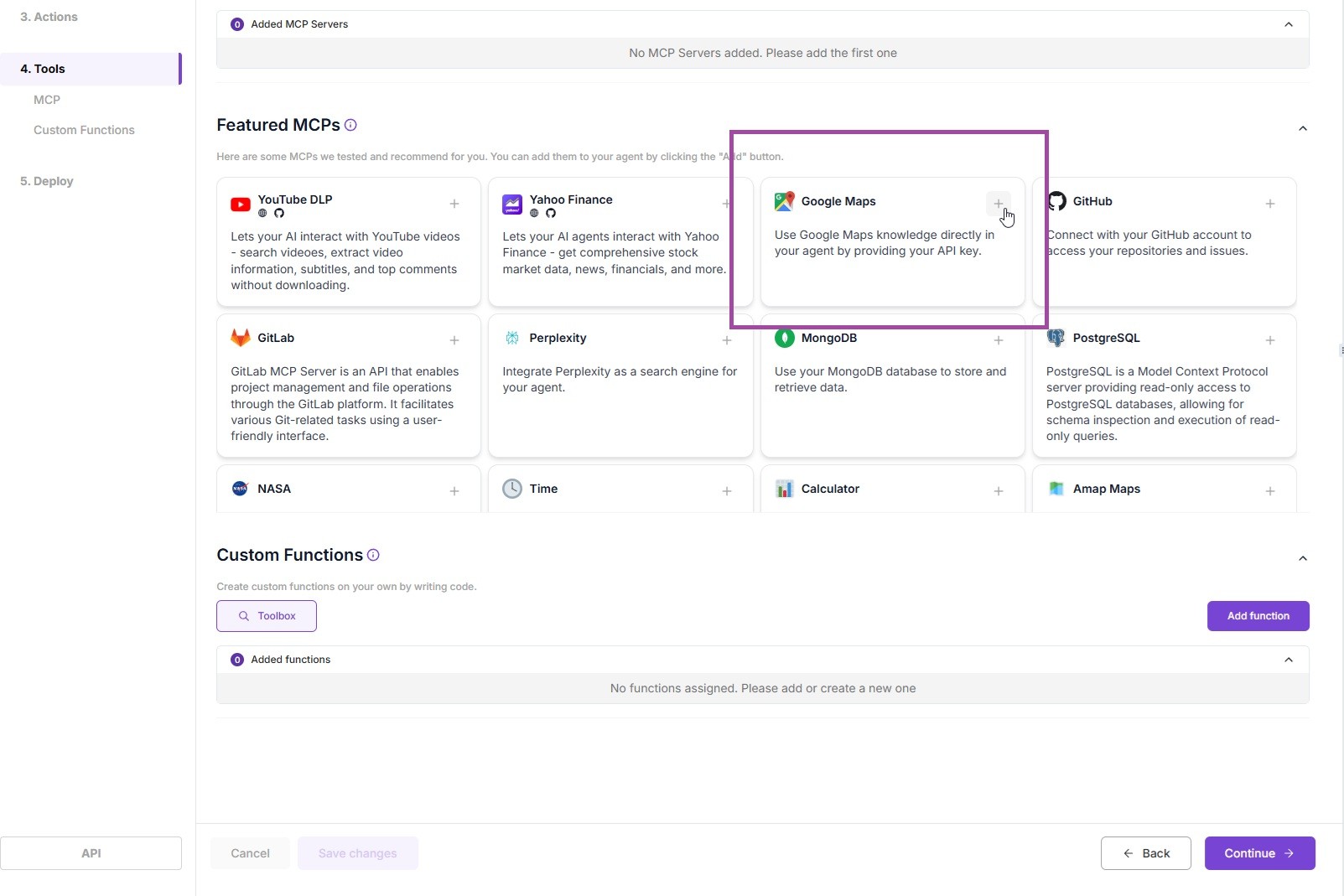
Open Your Agent Editor
Go to 4. Tools tab.Select “Google Maps”
Choose it from the list of available MCP integrations.Add Your API Key
Paste your Google Maps API key in the Environment Variables section.
👉 Get your API key here
🔧 Features You’ll Instantly Unlock
Once connected, your AI Agent will gain Google Maps superpowers!
Convert any address into geographic coordinates
Turn coordinates back into readable addresses
Find nearby places by name, category, or keyword
Pull business hours, reviews, and contact info
Calculate time and distance between properties
Retrieve elevation data for any location
Get step-by-step directions between listings
💡 Pro tip: Your AI handles the logic - you just ask, and it answers.
🚀STEP 5: Launch Your Agent
When ready, go to the Deploy tab to launch your agent on:
🧠 What Your Real Estate Agent Can Do Once It’s Live
Once your AI-powered real estate agent is fully set up with knowledge, Google Maps integration, and lead generation, it becomes a powerful assistant ready to engage visitors and convert interest into action. Here's what it can do:
💬 Understand User Needs Through Natural Conversations
Your agent can engage with potential buyers or renters in real time, asking questions to understand their specific needs - such as budget, preferred location, number of bedrooms, or type of property. This natural conversation flow helps guide users to the right listings without overwhelming them.
🏠 Recommend Properties from Your Listings
Based on the user’s input, your agent can recommend relevant listings pulled directly from your knowledge base. Whether someone is looking for a downtown loft or a quiet family home in the suburbs, your assistant can surface the best options instantly.
📍 Provide Driving Directions to Properties
Thanks to the Google Maps MCP integration, your agent can offer accurate driving directions to any property. This makes it easy for users to plan visits or open house tours directly from the chat interface.
🚗 Calculate Travel Times Between Locations
Is your client wondering how long it takes to get from a potential new home to their workplace or their kid’s school? Your agent can calculate distances and estimated travel times between multiple addresses in seconds.
🌍 Answer Location-Based and Geographic Questions
Your agent understands places. Whether someone asks “What’s the elevation of this area?” or “Are there cafes nearby?”, it can provide informative and accurate answers using real-time data from Google Maps.
📬 Capture and Deliver Qualified Leads
Instead of just chatting, your agent also works as a lead generation engine. It can collect user details like name, email, and preferences, then send them directly to your inbox - or wherever your team needs them. Every lead is also stored in your AgentX dashboard for easy follow-up.
Final Thoughts
With AgentX and the Google Maps MCP, your AI assistant becomes more than a chatbot- it becomes a knowledgeable real estate partner that truly understands both people and places.
Ready to build yours? Get started at AgentX.so
Share Blog
Related blogs
