

CHATBOT
How to Create a Lead Generation AI Agent Chatbot on AgentX - Formless and Straight to Your Mailbox

The Future is here 🚀
Are you interested in having an AI employee that can answer customer queries and generate leads 24/7? If so, here's what you can expect, as shown below.
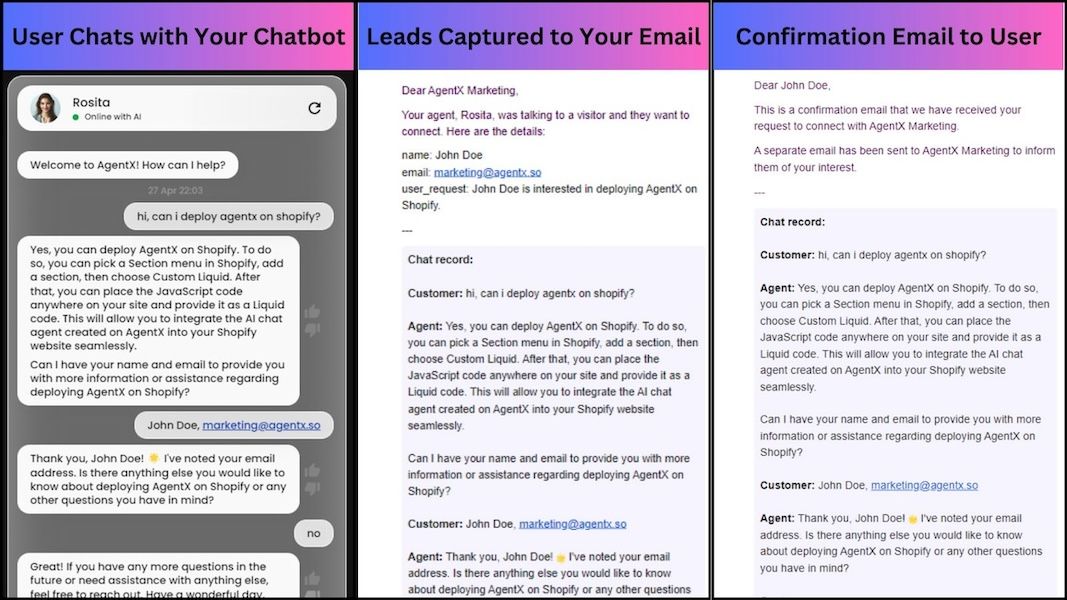
🔥Left: a user chats with the AgentX’s chatbot Rosita and is asked to leave contact right away (live on the AgentX website)
🔥Middle: the lead captured by Rosita is automatically sent to us along with a summary and full chat history
🔥Right: a confirmation of the request is sent to the user’s email along with the chat history
What is New? 🚀
🔥 The next-generation lead generation is formless with the AgentX chatbot. Using cutting-edge AI technology, it converses with users in natural language.
🔥 AgentX lead generation will ask for the name, email, and other contact information specified by you.
🔥 Leads automatically go to your email with a summary and chat history.
🔥 Email confirmation goes to the user with the chat history.
How to Set Up AgentX Lead Generation? 🚀
🔥 Want to set up lead generation for your business? It's super easy. Here's a step-by-step guide.
🔥 If you're already familiar with creating new AI agents on AgentX, jump right to Step 2.
🔥 If you have no idea how to start, don't panic. Book a meeting with us.
Step 1: Create AI Agent on AgentX 🤖
Log in to AgentX. Navigate to the AgentX Build tab and set up the AI agent (including General Info, Knowledge, and Actions) as you see fit.
Step 2: Add Lead Generation Under Actions 🤖
1. Under the "Actions" tab, enable "Lead Generation" and save. By default, "name" and "email" will be collected from your leads.
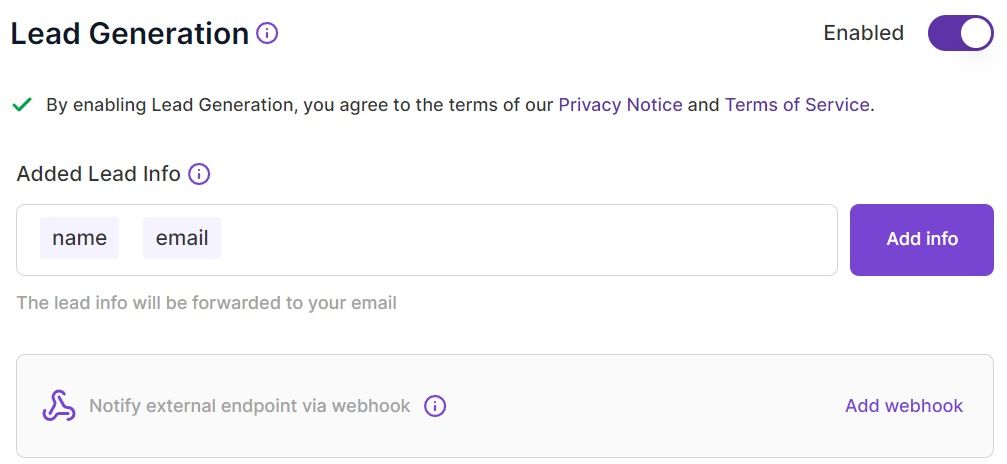
2. Optional: add or remove lead information fields from a dropdown menu
3. Optional: Add a webhook for integrated data processing. For example, a Zapier webhook can be added. As shown below, the lead will be captured in Zapier in addition to your email.
Step 3: Finish AI Agent Creation
Just click "Create Agent," and your AI chat agent will be ready in a few moments, depending on the size of the knowledge imparted.
Step 4: Deploy AI Agent
Visit here to deploy the created AI chatbot agent to your website.
Conclusion 🎯
On AgentX, you can build an AI Agent that not only answers questions but also knows how to collect leads from potential customers, then sends the lead summary to your email inbox. With just a handful of straightforward steps, you have successfully incorporated the power of AI into your business operations.
AgentX is eager to provide you with the most efficient support in managing your day-to-day tasks. This upgrade will not only streamline your business processes but also open up a wealth of opportunities for growth and innovation. With AgentX as your digital ally, you are now fully equipped to navigate the complexities of the business world and rise to the top of your industry.
Share Blog
Related blogs
