

AGENTX FEATURES
Easy Steps To Add URLs In Chats For Your AI Agent: A Setup Guide

Welcome to the digital era where Artificial Intelligence (AI) isn't just a buzzword, but a pivotal part of enhancing user interactions and functionalities in various applications. Continuous innovations at AgentX take your AI agent to the next level. Here are three newly added features:
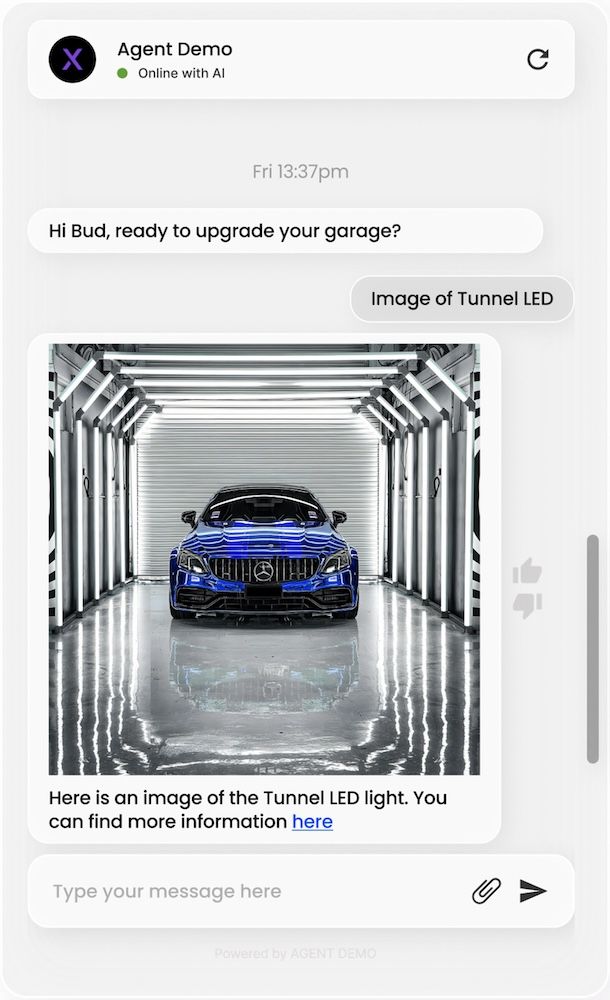
🔥 Your AI agent can now display images in chats.
🔥 Your AI agent can now display URLs in chats.
🔥 You can now configure branding for your AI agent.
Here's how it will look in a real E-commerce example (with logo and brand name masked). This AI agent is deployed on a Shopify website. With easy configuration from AgentX, it's able to show images and URLs in chat conversations. Furthermore, the “Powered by” tag at the bottom of the chat window can be configured to your own branding.
AgentX has provided three blogs to help you with the setup. Continue reading for how to set up the URL display guide.
Setup Guide For URL Display
0️⃣ If you are already familiar with creating new AI agents on AgentX, jump right to the next step.
1️⃣ Navigate to the “Knowledge” tab, find the “Frequently asked questions,” and set up the FAQ as shown below.
🚀 The first part is for setting up image display
🚀 “Here is an image of the Tunnel LED light. You can find more information here” - This is additional text for the answer in the FAQ. To add a hyperlink to text, you may follow the markdown format as shown below: [text on which hyperlink is to be added](URL of the hyperlink). Make sure that there is no space between [ ] and ( ) and your URL starts with “https://”
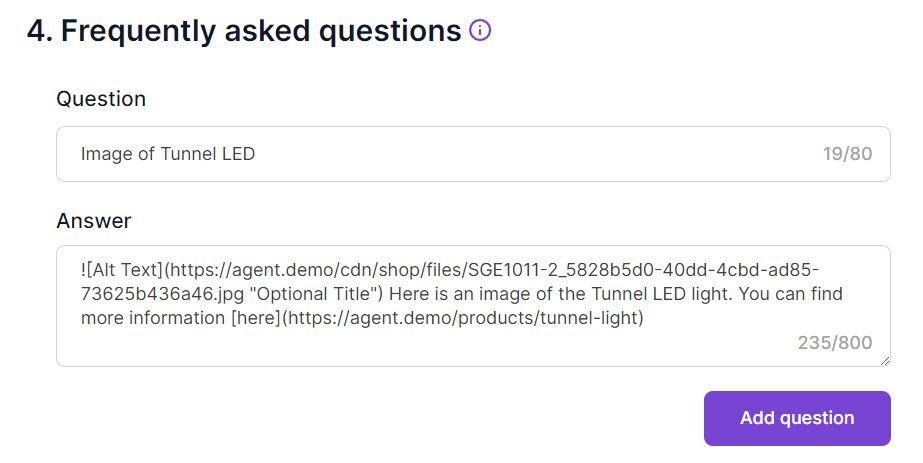
2️⃣ Click “Add question” and save. Feel free to toggle “Display the question” to make it appear as conversation starter.
3️⃣ That’s it. If your AI agent is already live, the update will propagate automatically. Otherwise, visit here to deploy the AI agent chatbot to your website.
Conclusion
Thank you for using AgentX. Make sure to subscribe to our newsletter from homepage to receive product updates. If you have issues/want to talk about your business needs, chat with our AI agent Rosita or book a meeting with us.
Share Blog
Related blogs
