
🔍 Supercharge Your AgentX Workflow with Perplexity Sonar (via MCP)
Perplexity’s Sonar API, combined with AgentX’s built-in MCP (Model Context Protocol) support, gives your AI agents the ability to perform live web research with reliable citations — all without leaving your AgentX workspace.
This integration lets your agents instantly access and process the latest information from across the web, grounding their answers in trusted sources. Whether you’re fact-checking, summarizing breaking news, or comparing products, your AI will have an always-on research assistant at its disposal.
If you’re new to MCP or want to see how it’s powering real-world AI workflows, check out our article:
How to Use MCP Servers to Supercharge Your AI – Real Use Cases
1. Get your Sonar API Key
Create an API key in the Perplexity developer portal (Sonar). Follow their guide and generate a Sonar API key.
See information here: https://github.com/ppl-ai/modelcontextprotocol?tab=readme-ov-file#step-2-get-a-sonar-api-key
2. Enable Perplexity MCP Tool
In the Tools section, open Other integrations
Find “Perplexity” in the list
Click to ENABLE and configure it
3. Add Your API Key
In Environment Variables, add your PERPLEXITY_API_KEY
4. Save and Deploy
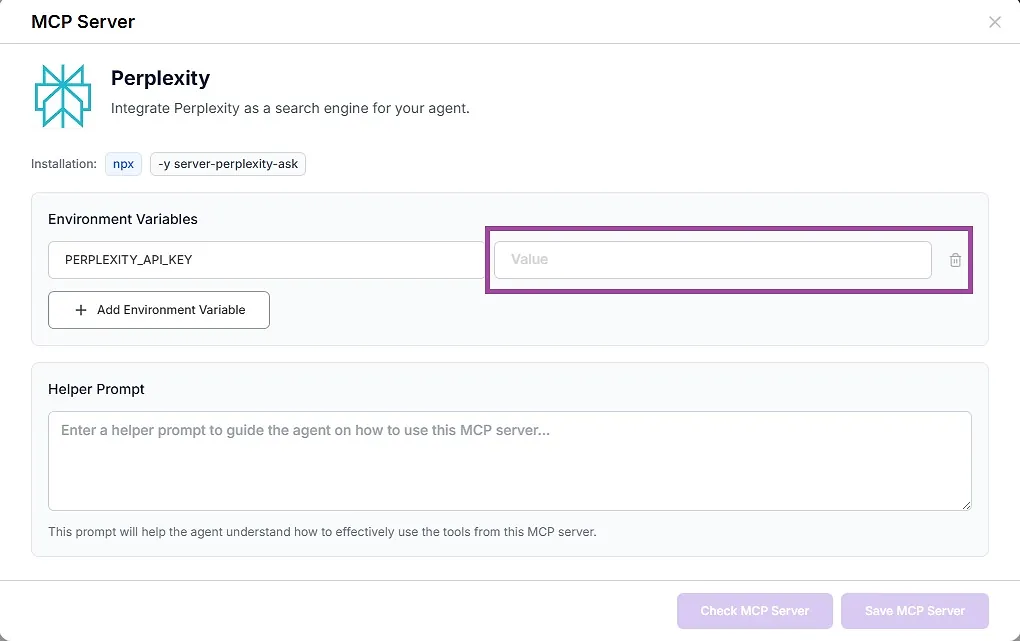
Click Save (or Update) to apply your changes.
✅ You’re Done! What Happens Next?
Your agent can now perform real‑time web research via Perplexity Sonar and return grounded answers with citations. Typical use cases:
Ask current‑events questions and get sources
Summarize topics with links
Compare products, tools, or docs on the web
Pull quick facts with references
Just ask naturally (e.g., “What changed in React 19? Cite sources.”). The agent will call Perplexity as needed.
Summary
Agent Editor → Tools → Perplexity
Paste API Key into
PERPLEXITY_API_KEYSave & Deploy