Skip to content

AgentX tutorial

Creating a Custom Tool in AgentX

Learn how to quickly create custom API-powered tools in AgentX using natural language and automatic code generation.

1 min read

AgentX gives you the ability to extend your agents with powerful Custom Tools. These tools allow your agent to call external APIs, run Python logic, and fetch real-time data - all generated automatically from natural language.

The Custom Tool Builder converts your description into production-ready Python code, so you can integrate any service in minutes.

Follow this quick guide to build your first tool.

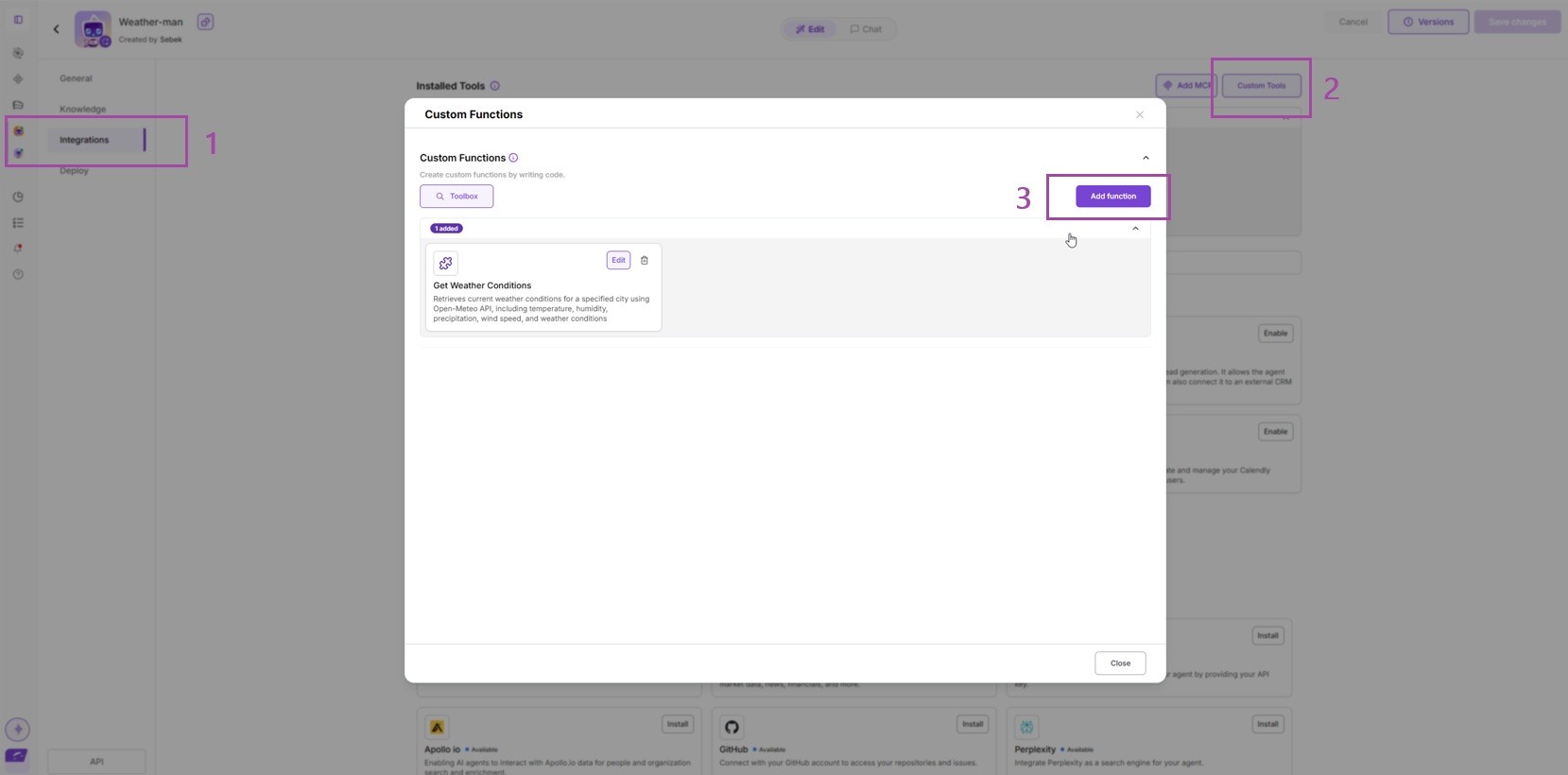
1. Open Integrations → Custom Tools

In your agent workspace, go to Integrations and open the Custom Tools section.
This is where you manage and create tools for your agent.
Creating Tools with AI

2. Describe What You Want to Build

Just type a sentence describing your tool’s purpose - no coding required.

Example:
“Create a tool that retrieves weather data from api.open-meteo.com.”

The more specific you are, the more precise the generated code will be.

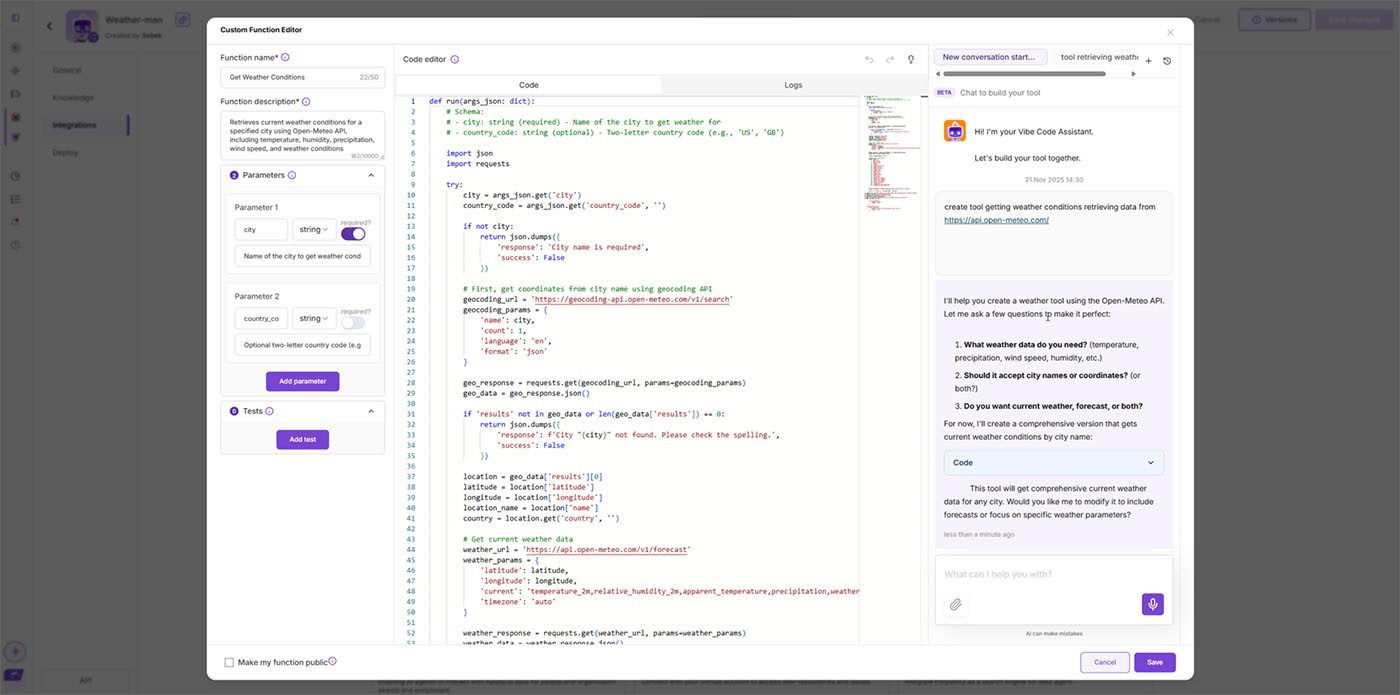
3. Let the C2C Agent Generate the Code

AgentX automatically writes a complete Python function for you, including:

  • API request
  • Error handling
  • Output formatting
  • Schema definitions

You can review or edit the code anytime.
4. Save and Test Your Tool

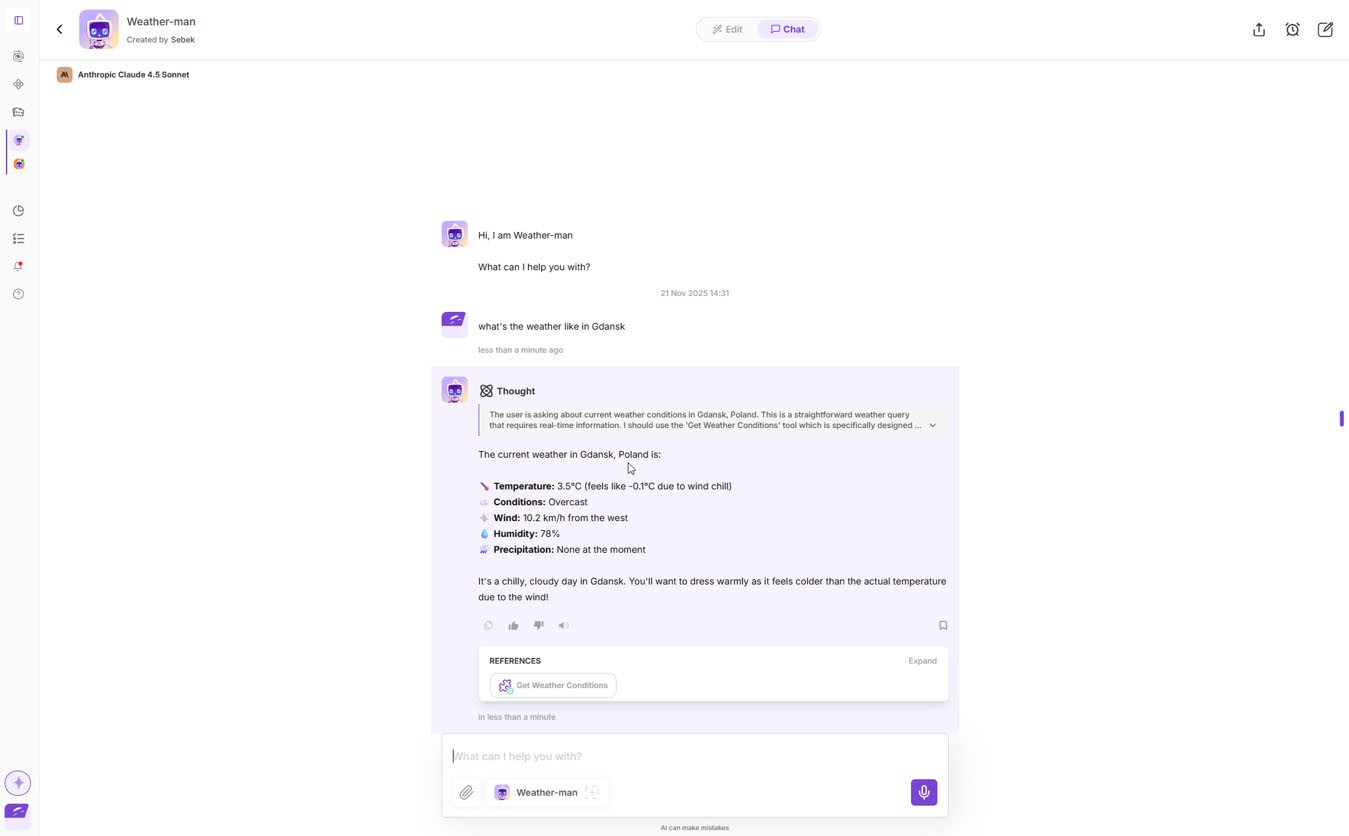
Click Save, open your agent’s chat, and ask a question that triggers the tool.

Example:
“What’s the current weather in Gdańsk?”

Your agent will call the tool, fetch live data from Open-Meteo, and return structured results.
That’s It - Your First Custom Tool Is Ready

WithAgentX**, creating integrations is as simple as describing them.

You can now:**

  • Connect any external API
  • Build internal automations
  • Add data retrieval, calculations, or ML workflows
  • Give your agent superpowers with zero setup overhead
  • It's like your own MCP Tool

More tutorials

All tutorials

Custom Branding for Agent Emails

You can now choose between AgentX branding, completely custom branding with your own logo and identity, or a clean unstyled option — all available for both Lead Generation emails and regular agent-sent messages. Configuration is now unified and easier to access, making it simple to keep every outgoing email consistent with your brand.

Read

How to add a MCP to your AI Agent

MCP (Model Context Protocol) allows you to connect your AI application to any desired third-party app as long as it supports it. Here is a step-by-step tutorial on how to set it up and connect with your AI agent. We will give an example on YouTube MCP.

Read

How to Automate Agent Tasks with AgentX

Discover how to automate your AgentX agents - from daily AI news briefings to fully autonomous SDR outreach - so your business runs on autopilot.

Read

How to Build AI Agent Workforce in AgentX

With AI Agent Workforces, you’re not limited to a single AI agent - you can build a whole team of specialists

Read

How to build an AI Agent - beginner's guide

Creating your first AI agent in AgentX, tuning prompts, instructions, and building knowledge bases. AgentX offers a no-code platform to create powerful AI agents for various use cases. Customize your agent’s bio, greeting, and response style, add knowledge bases, and enable optional features like lead generation or image generation. Once built, deploy your agent across multiple platforms, including websites, Slack, and Discord.

Read

How to Connect AgentX Lead Gen to ActiveCampaign CRM

AgnetX makes it incredibly simple to generate leads using AI agents and automatically sync those leads into your favorite CRM — including ActiveCampaign.

Read

Start your AI automation journey today

Sign up for AgentX and let AI handle your routine tasks. No credit card needed.