
Custom Branding for Agent Emails
You can now choose between AgentX branding, completely custom branding with your own logo and identity, or a clean unstyled option — all available for both Lead Generation emails and regular agent-sent messages. Configuration is now unified and easier to access, making it simple to keep every outgoing email consistent with your brand.
AgentX allows you to fully customize the branding of any email your agents send. This includes:
Lead Generation emails (confirmation emails sent to leads)
Regular emails sent by your agent during conversation flows
How to setup custom branding
You can decide whether emails should use AgentX branding, your company’s custom branding, or no branding at all.
1. Custom Branding for Lead Generation Emails
Go to Integrations → Lead Generation
If you haven’t enabled your Lead Generation tool yet, save it first
Enable Send confirmation emails
Click the wrench icon to open advanced settings
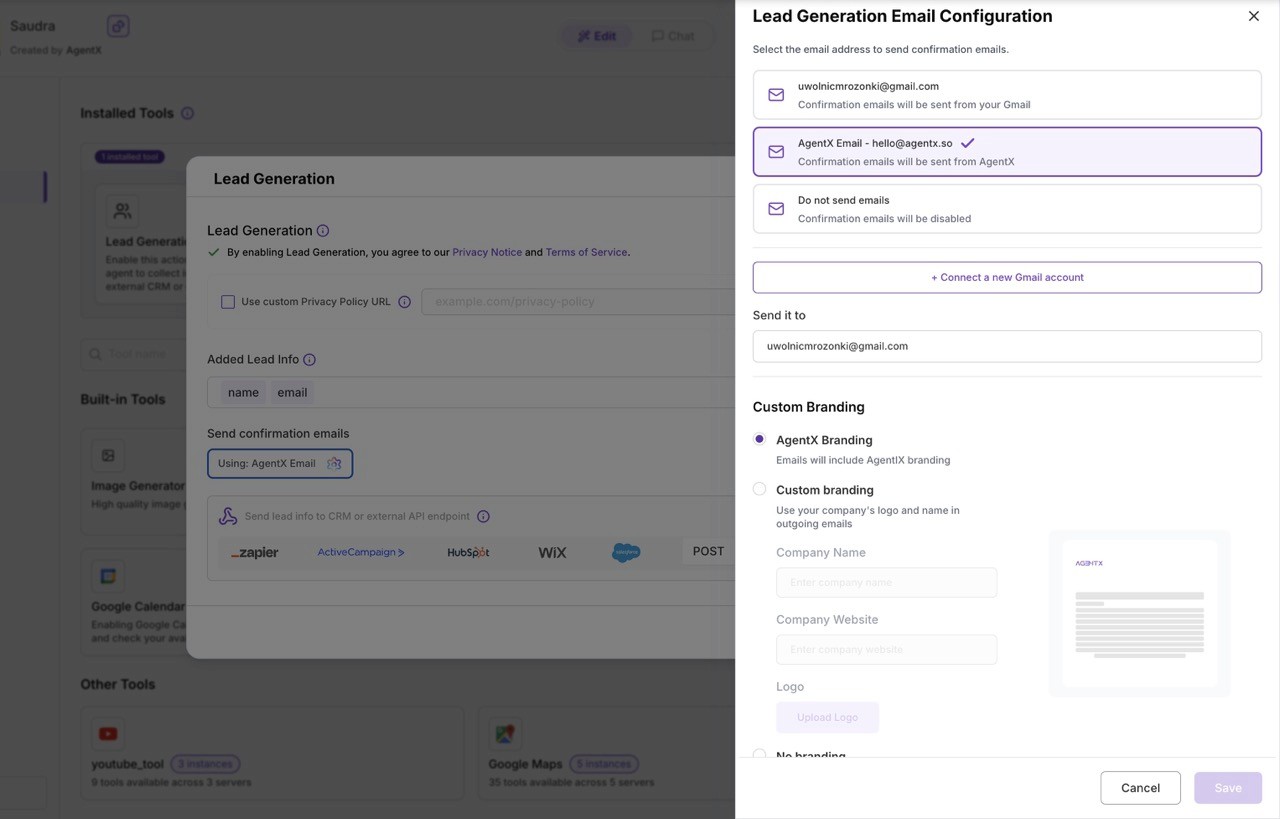
Inside this panel, you’ll find all branding options:
Email Configuration Options
Sender Email Address
Choose which email address your confirmation messages will be sent from
(by default:[email protected])Recipient Email Address
Choose where form submissions and confirmations should be delivered.Branding Options
You can decide how emails should look:
AgentX Branding
Emails include standard AgentX design and structureCustom Branding
Use your own company logo, name, and identity in all outgoing emailsNo Branding
A clean, plain-text style - similar to a regular email written by your agent
2. Custom Branding for All Other Emails
You can also apply the same branding settings to all general emails sent by your agent.
Go to your Workforce
Open the General / Edit Options tab (image will be provided)
Locate the Email Branding section
Choose between:
AgentX Branding
Custom Branding
No Branding
This ensures full consistency across every message your agents send - whether it’s a follow-up email, notification, or automated response.
