AgentX allows you to fully customize the branding of any email your agents send. This includes:
- Lead Generation emails (confirmation emails sent to leads)
- Regular emails sent by your agent during conversation flows
How to setup custom branding
You can decide whether emails should use AgentX branding, your company’s custom branding, or no branding at all.
1. Custom Branding for Lead Generation Emails
- Go to Integrations → Lead Generation
- If you haven’t enabled your Lead Generation tool yet, save it first
- Enable Send confirmation emails
- Click the wrench icon to open advanced settings
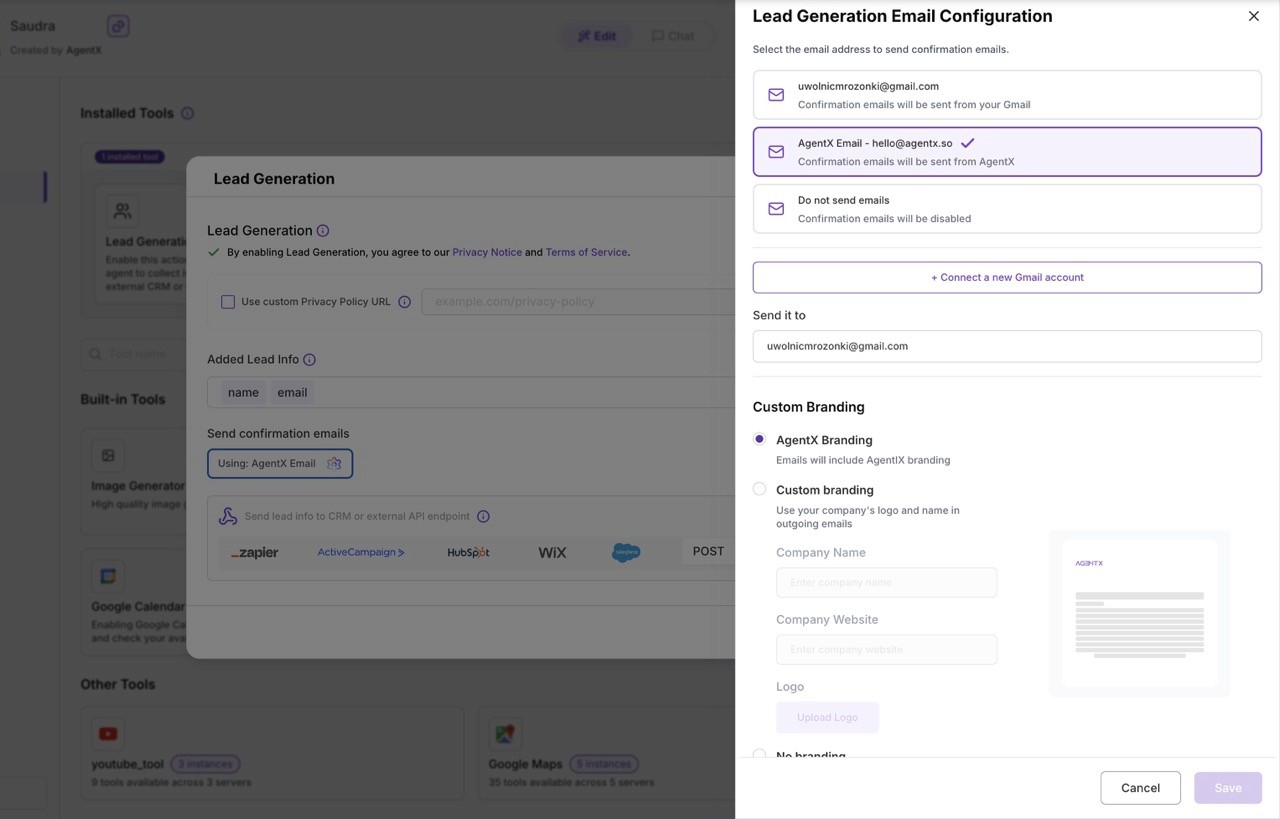
Inside this panel, you’ll find all branding options:
Email Configuration Options
- Sender Email Address Choose which email address your confirmation messages will be sent from (by default:
[email protected]) - Recipient Email Address Choose where form submissions and confirmations should be delivered.
- Branding Options You can decide how emails should look:
- AgentX Branding Emails include standard AgentX design and structure
- Custom Branding Use your own company logo, name, and identity in all outgoing emails
- No Branding A clean, plain-text style - similar to a regular email written by your agent
2. Custom Branding for All Other Emails
You can also apply the same branding settings to all general emails sent by your agent.
- Go to your Workforce
- Open the General / Edit Options tab (image will be provided)
- Locate the Email Branding section
- Choose between:
- AgentX Branding
- Custom Branding
- No Branding
This ensures full consistency across every message your agents send - whether it’s a follow-up email, notification, or automated response.