Reading Content from Uploaded Files
Learn how to enable your AgentX assistant to read and understand uploaded files using Text Extraction and Deep Image Understanding tools.
Your AgentX assistant can read and understand files you upload - from PDFs and scanned pages to images and handwritten notes. This helps your agent extract important information or analyze visuals directly from the content you provide.
AgentX provides both basic and advanced skills that allow your agent to process uploaded files, analyze visuals, automate email communication, and improve the chat experience from the first interaction.
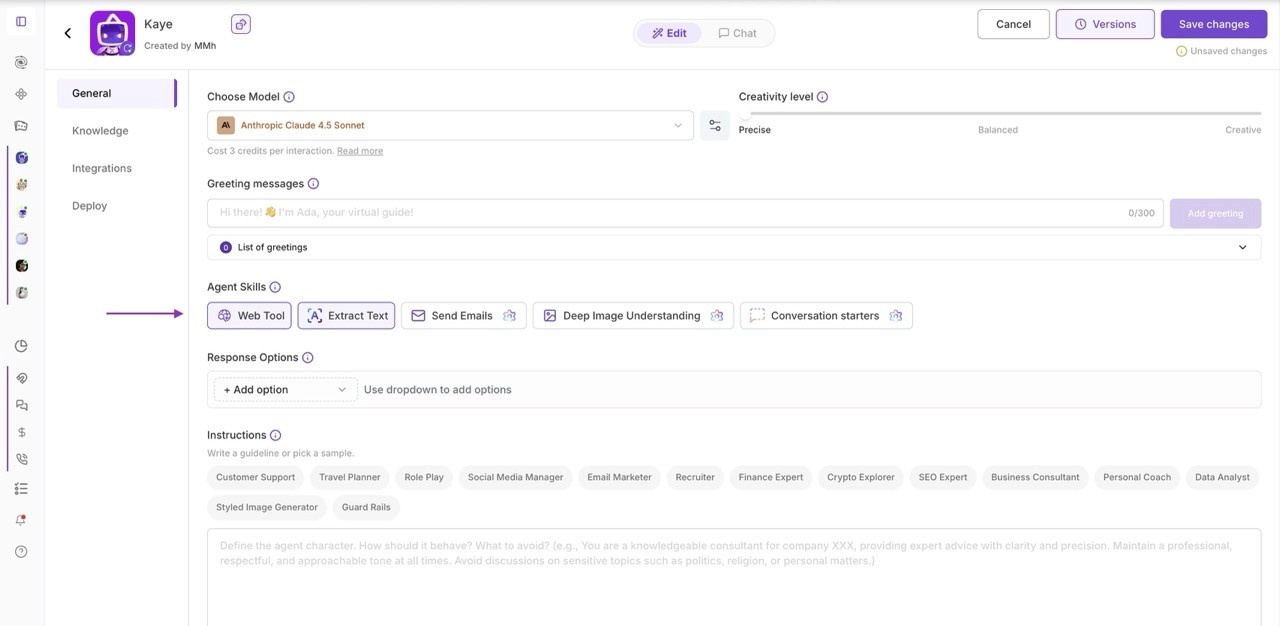
Adding skills to your Agent
Available Agent Skills
🧾 Text Extraction
Use this skill to capture any written text visible on an image or document - for example, text from signs, labels, invoices, or screenshots.
Examples: Upload a photo of a contract page, and your agent extracts all readable text for you to edit or search through.
Extract text from any image or PDF - instantly capture words from photos, scanned documents, or screenshots.
Turn pictures into editable text - quickly copy or edit written content from signs, labels, or handwritten notes.
Get clean text from images automatically - perfect for invoices, receipts, forms, or product packaging.
🧠 Deep Image Understanding
This feature allows your agent to analyze the full image, not just the text. It recognizes objects, handwriting, charts, and layouts to understand what’s shown in context.
Example: Send a whiteboard photo, and your agent can summarize the ideas, list the topics, or describe the diagram structure.
Understand what’s inside any image - detect objects, scenes, diagrams, and relationships between elements.
Analyze visuals beyond text - the AI interprets charts, handwritten notes, and complex document layouts.
Comprehend full image meaning - ideal for analyzing infographics, presentations, engineering drawings, or medical scans.
✉️ Send Emails
This skill allows your agent to send emails automatically on request.
What your agent can do:
Send emails to you using the default AgentX email
Send emails to any external address after connecting your Gmail account
How Email Sending Works
When enabling Send Emails, you can choose:
AgentX Email ([email protected])
Emails are sent only to the agent creator (default).Your Connected Gmail Account
Allows the agent to send emails to any recipient.
To send emails externally, connect a Gmail or Google Workspace account once - then select it in Agent Skills.
Example command:
“Email today’s summary to [email protected].”
🗨️ Conversation Starters
Conversation Starters help guide users toward the most important or valuable questions from the very first interaction.
They appear as clickable prompts above the chat window.
You can use two types:
Dynamic Starters (AI-generated responses)
Only the question is defined - the agent generates a fresh, contextual answer every time.
Ideal for discovery, personalization, or up-to-date topics.FAQ-Based Starters (Fixed responses)
Reuse an existing FAQ to always return a predefined answer.
Best for instructions, marketing messages, or compliance-sensitive content.
Examples:
“How can you help me automate my daily tasks?” → dynamic
“How do I integrate this agent with WhatsApp?” → FAQ-based
⚙️ How to Enable These Features
Go to Agent Dashboard → Edit
Open the General tab
Scroll to Agent Skills
Add one or more of the following:
Text Extraction
Deep Image Understanding
Send Emails
Conversation Starters
That’s it - your agent is now equipped to read files, analyze images, send emails, and guide conversations intelligently.